Protect what matters – even after you're gone. Make a plan for your digital legacy today.
Forum Discussion

Anonymous
4 years agoDown arrow shortcut conflict and obstruction from 1p extension
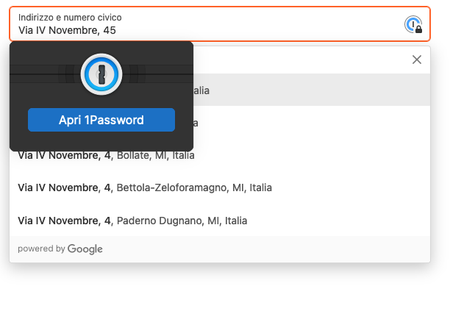
Actually the 1p browser extension is a complete mess to use in pages forms
see the screenshot
it gets in the way into:
browser autocompletion (not showed in the ss above because of chang...

ag_chantelle 1Password Team
4 years ago1Password Team@lcorsini
Ahh yes, if you're comparing it to the browser autofill then I can see the conflict here. Ideally, we would recommend saving your details in 1Password directly and using it to autofill forms when you're on a checkout page. If you have several different contact cards that you use, based on where you shop, you can save individual Identity items based on that need.
If you wish to continue using the browser autofill history, you can adjust how 1Password behaves. Right click the 1Password icon in your browser toolbar and choose Settings. Under Autofill, disable "Show autofill menu on field focus". This will automatically disable the inline menu from showing when a field is focused. If you would like to use 1Password in the field, then clicking the blue icon will present you with the appropriate options.



