Protect what matters – even after you're gone. Make a plan for your digital legacy today.
Forum Discussion

nukmicah
3 years agoDedicated Contributor
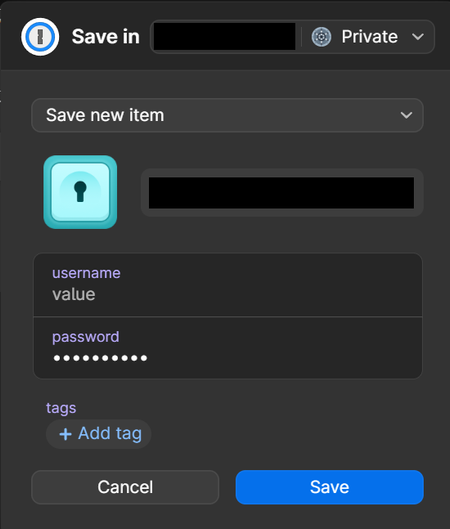
Tag list and/or autocomplete suggestions in "Save new item" popup
Please make it easier for me to pick existing tags with this browser popup, ideally with a dropdown list and autocomplete suggestions while I'm typing. It reduces the chance from duplicate tags wheth...

Anonymous
3 years agosteph_giles thank you for your quick reply. I have been testing mainly in the browser extension and a bit in the desktop app. I just started with a fresh account without tags, and found that when I had created a tag, I couldn't select that tag for a new item, I had to re-type it. Then I started looking for information online and came across this discussion, which summed up exactly what I meant.
Having read your reply, I'm trying it again and notice that both in the browser extension and in the desktop app, I do see existing tags that I can select. I don't know why I could't see it before. That makes a huge difference already!
Regarding the folder structure: it's just what we were used to in LastPass. There we created a separate folder for each client, with all accounts related to one client in one folder. And then they were also grouped into folders of various types of clients. I guess we would be able to achieve this using vaults and tags, but it might be just a bit too farfetched.
Having read some more, I notice a lot of people rely on the search functionality and I guess we just have to re-invent how we structure all our data. It doesn't necessarily have to be the same way we did it before. I guess we're just so used to working with folders (in Windows explorer, Google Drive etc. that we were surprised that we couldn't use it here.
We plan to do some more testing in the next few days before making our final decision.


