Protect what matters – even after you're gone. Make a plan for your digital legacy today.
Forum Discussion

nukmicah
3 years agoDedicated Contributor
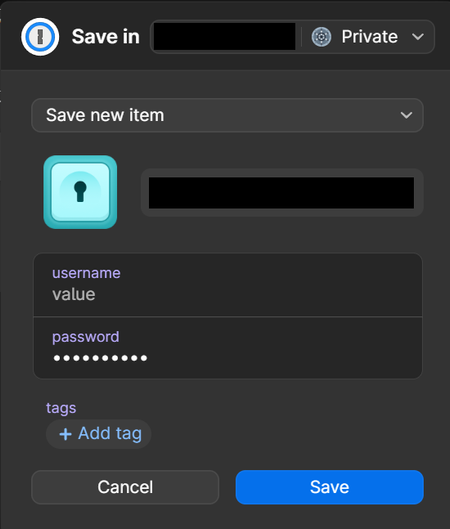
Tag list and/or autocomplete suggestions in "Save new item" popup
Please make it easier for me to pick existing tags with this browser popup, ideally with a dropdown list and autocomplete suggestions while I'm typing. It reduces the chance from duplicate tags wheth...

Thorz
2 years agoOccasional Contributor
I am a new user too as others that have posted above.
I have invested a lot of time to convert the folder based structure that I had on my previous password manager into tags and everything works great when I am using the desktop client. During my trial I was always told that 1Password could do with tags everything other password managers could do with folders, and I can agree with this when using the desktop client.
The problem arises when I have to use the Chrome browser extension. As far as I can see it is impossible from there to see your list of tags as you can from the 1P desktop client. This makes extremely difficult to locate specific content in the extension, and when you have over 800 entries in your vault with more than 150 tags the whole process becomes very frustrating.
Trying to locate a specific entry using the search field on the extension is extremely hard when you cannot filter by tag, so searching for "work" gives results with every single entry that contains the word "work" on it, not only the items tagged with "work".
I have previously read user answers on some threads about the limited tag support on the browser extension where they basically say this to new users: "You have to learn to use 1Password the way 1Password works. The browser extensions are there just to be used sporadically, you should instead use the desktop clients most of the time. If you cannot adapt to the way 1P works you should move on to another password manager". I think these answers are unkind with new users, specially when not everyone can use the desktop client everywhere. In my situation I am not able to install the desktop client on my work PC due to work policy restrictions, and using 1Password only via the Chrome extension at work is extremely frustrating because of this.




