Protect what matters – even after you're gone. Make a plan for your digital legacy today.
best practices
202 Topics
Feature Request: Show Original Contributor of Items in Shared Family Vaults
Summary Please add a built-in way to display who originally created or contributed an item to a shared vault in 1Password Family. Problem In shared family vaults, it is currently not possible to see who an item originally belongs to once it has been shared. This makes it unclear who owns a specific account, even though the item is visible to everyone in the family. As a workaround, we manually add tags with the name of the person who created or contributed the item. This allows sorting and filtering by owner, but it is manual, error-prone, and easy to forget. Proposed Feature Display non-editable metadata such as: “Contributed by: Name” or “Original owner: Name” This information should remain visible in the item details after sharing or moving an item into a shared family vault. Benefit This makes it easy to understand who an account actually belongs to, even when it is shared for convenience. It improves clarity in family vaults, avoids confusion, and removes the need for manual tagging. Reference Apple Passwords already shows this information for shared items using labels like “Contributed by: Name”, which provides clear ownership at a glance.18Views2likes3CommentsMultiple Business Accounts Logged in (one) 1Password.app
We have a small support team, including a primary admin who needs 100% access to the supported 1Password business accounts. Many devices (iPhones, Macs, iPads, Androids) are work/personal blended with applied business/personal separation. In our case, our team uses 1Password for Business for support, but also logs into personal accounts with the same 1Password app on the same devices. When navigating Business support, the autofill/access displays user/passwords for ALL Business accounts logged into 1Password.app. Is there a streamlined way to dedicate specific access when on the Business side versus the personal side? When logging into Netflix (personally), I don't want to have to scroll through a list of client logins to find mine. We have tried using "Collections" with limited success, if any.20Views0likes2Comments
Why Do Copies of Logins Appear in Archive?
A member of my family (call them Andrea) who has a personal 1Password license forgot their main 1Password password for that account but could still authorize using biometrics. As a result of not knowing their password they could neither create new login items nor update existing ones. Per the 1Password support area, I added them to my family account and copied Andrea's items from their Private vault on the old personal license using copy and paste into their Private vault attached to the family account. I also moved all items that my partner (call them Peter) and I shared from the Shared vault attached to the family account to a new vault that was limited to the two of us. After taking these steps, the items that had been archived from the Family Shared vault were still in the archive, visible to all users when you clicked on the button that says View Archived Items; all the items from the Private vault from the former (Andrea's) personal account were visible to that formerly personal user (Andrea). My primary question is: why are all the old passwords from the personal vault appearing in Andrea's archive? My second question is: How can I hide the archived items from the Shared vault that were formerly visible to me and Peter and are now visible to Andrea as well? Do I just have to delete them??16Views1like1Comment
How do I transition from 1:1 mapping of authentication and authorization to simpler options?
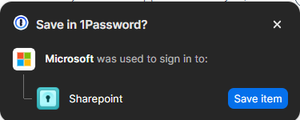
I have never taken the following suggestion for fear of not knowing what would happen next. I don't know what would happen next, because I have multiple Microsoft accounts and access multiple SharePoints: In a nutshell - How is this functionality supposed to work and what problem does it solve? More specific concerns are below with additional questions which may be more helpful to any of you potentially answering this question. Thanks in advance! Usually, a Microsoft account is going to 1:1 with SharePoint sites, and there are never SharePoint sites which would require access by more than one of my Microsoft accounts. Sometimes a Microsoft account is going to map 1:many where 1 Microsoft account maps to more than one SharePoint Seldom 2 Microsoft accounts might need access to the same SharePoint. For Example, I am an employee of Consult-o-rama, and the account referred to is Microsoft here in the dialog above is a login called Consult-o-Rama in my Consult-o-Rama vault dedicated to all things Consult-o-Rama. Further, the SharePoint referred to here, is a SharePoint of a company which was a joint venture 30 years ago and with whom we have a close relationship. They have their own AD, but Microsoft federation is such that we are allowed to log into their sites separately using our same login as guests. Likewise, we can switch orgs in Teams and use their separate teams with the same credentials, as guests. My Consult-o-Rama login credential, which is a Microsoft account, is stored in 1password as a Login with URLs for all the sites I would use it for in the Consult-o-Rama vault. I also have a client vault which we can call Client 1. Client 1 has dedicated logins for only Client 1. But in my Consult-o-Rama vault, my Consult-o-Rama credential will have sites of both Consult-o-Rama resources, and only the SharePoint URL for the Client 1. With me so far? Other background: I have 4-7 vaults depending on how many clients I have. consult-o-rama, client 1, Client 2, Personal, and then Client <#> for however many clients I need to have them for, I sometimes have vaults for additional purposes. I use separate browser identities and have the 1password addon in the browser filtering only on the relevant vaults per browser identity (so in the Client 1 Edge profile, I have it filtering only for Consult-o-Rama and Client #1) The login credential record "Consult-o-Rama' is one of 5-10 microsoft account. I log into at least that many SharePoints. Some of the microsoft accounts are all in Consult-o-Rama. Client #2 and others will have other Microsoft Accounts. None of my login credential records are named Microsoft or SharePoint. How can I best use the functionality I'm being prompted to use without doing the following? Creating duplicate records of login credentials. Being clear about mapping identities and being able to label "Microsoft" in this example instead as "Consult o Rama', and "SharePoint" instead as "consult-o-rama" SharePoint. So that in the future I can map 1 to many and many to 1 logically and without confusion? And if none of that is clear - How is this functionality actually supposed to work? Thanks!13Views0likes2Comments
Auto Fill Security Codes
I have an Apple McBook Air macOS 26.1 (25B78). I am using Google Chrome browser Version 142.0.7444.176 (Official Build) (arm64). I am also using 1Password for Mac 8.11.18. I want to do autofill on the Chrome browser for logins and passwords from 1Password and I also want to use autofill for security codes sent via text message to my iPhone and MacBook Air. How do I do this?Solved44Views0likes3Comments
Avoiding Personal-Business Use Mixups
I currently have a 1Password family account, with multiple vaults, including one for the nonprofit I lead. Now I'd like my Board of Directors to use 1Password as well. However, I'm concerned about mixups and wonder if I'm better off with a different arrangement (e.g. a different password manager for business use). My question is, how does one actually shift between personal 1Password use to business use and back again on the same device(s)? Is it like opening different vaults? Or will I need to log in and out of each separate account? Or what? Thanks!Solved59Views0likes8Comments
What is the procedure to transfer 1P to a new iPhone?
Hi, I will be purchasing a new iPhone and based on my searches, I believe all that I have to do is setup 1P on my new iPhone, login, and then it will be ready after it syncs. However, what I'm uncertain about, though, is that in my case, I will be backing up my old iPhone and restoring it onto my new iPhone, so that I retain the setup and apps that I have on my old iPhone. After the restore onto my new iPhone and when I boot it, what do I need to do to get 1P activated on this new iPhone (and deactivated on the old iPhone)? Thanks!Solved25Views0likes3Comments
2 entries same password
Hi, is there a solution for the following scenario: i have a Windows Account and an EntraID Account that are fully synced in the background. So i have 2 entries with the same Password. Is there a way to sync this entries somehow so that i need only to change the password at 1 single point in a 1Password entry? Is this maybe a possible New Feature for 1Password? BR Thomas6Views0likes1CommentMoving existing 2FA to 1Password using printed QR code
Hello, I am planning to make use of 1Password (I have the paid Family plan) to store most of my TOTP codes - moving on from Authy. Because Authy does not allow for export of TOTP codes, I have most of the TOTP codes also backed up with a printout of the QR code used to originally add the TOTP to Authy. How can I add these TOTP codes to 1Password using the printed QR codes (ie. not on screen/in browser)? I would very much like to avoid needing to re-create all of these codes from scratch. Thank you.19Views0likes1Comment