Level up your business security with free, on-demand training and certification. Explore 1Password Academy today →
betas
2198 Topics
#ME-271 feedback: Inline menu hidden in Safari on iOS when system AutoFill is enabled
Hello, I recently noticed that a lot of login forms were no longer showing the 1Password drop-down to select a credential. I believe it is related to this change referenced in the title. Simply put, I prefer the browser extension to select credentials for logging in. It handles OTP codes faster and easier than the system autofill in iOS/iPadOS. Instead, using the system autofill requires extra taps, needlessly populates the clipboard with OTP codes, and generates notifications about the OTP being copied to the clipboard that I'm frequently needing to dismiss. I'm not sure if this is something that can be made optional in the browser extension settings, but I strongly dislike this new behavior and hope that it will be reverted to the previous behavior, or at least made optional. Thank you.2.6KViews7likes59Comments
Browser Beta: Feedback regarding the new sign-in experience
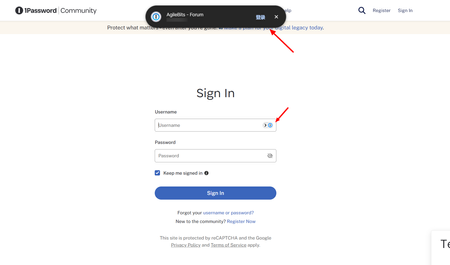
So I was suddenly being upgraded to this new experience today, however, it does not seems to be appearing on the https://releases.1password.com/b5x/beta/#changelog. I guess making the login selection up above resolves one very specific issue - sometimes it can annoying to have 1P prompting under a text box, especially when filling in forms. But I don't think this new design is the answer. Main issue - Long mouse travel - Instead of just flicking my mouse to choose my account, I now have to move my mouse all the way top to click it, which is never a trade off I would take to fix the "filling in the form" issue. Secondly, it was not visually better to have a much larger pop up blocking my web view whenever I am logging in.Solved476Views2likes21Comments
Linux Nightly Client No Longer Connects With Browser
The current Linux nightly client as of a week or so ago no longer connects with the browser extensions, I have tested on a handful of browsers (Firefox stable/beta/nightly and and chrome stable/dev, all system installed, not flatpak) with both the stable and dev extension and they are longer talking at all, browser extensions act as if no client is installed and want to login with the web. Another machine running the same os (Pop OS) with the stable client continues to work as expected. This started around a week or so ago, just wanted to make sure it was a known issue.162Views1like13Comments
New tab opens on Safari iPhone every time I go into Safari.
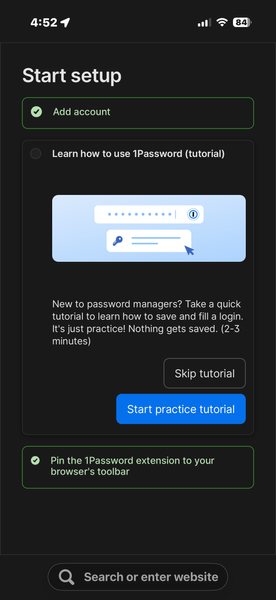
I have been using 1Password 8 for a long time, years, I just disabled it. I am running 1Password 7 again. all of a sudden, after the recent 1Password 8 update, some weird tab has to be closed every time I go into Safari on my iPhone. I have attached print screens of these pages that show up every time now. It says welcome to 1Password. I have been using it for a decade I think at least. Now it’s asking me to do a bunch of stuff. I have no idea. Disabling the extension, solved the problem. Why do I have to set up something that’s been working perfectly. It still works.. but now I have to spend 45 minutes figuring out something new. So the only thing to do was disable the extension in settings and enable 1Password 7’s extension. I have deleted 1Password 8 from my iPhone. I don’t know what is going on. I only know that I’m looking for a new password program now. It’s clear that the people at 1Password want to make sure they make the app suck so bad that they have no more customers. 1Password version 8 has been fine on the iPhone, not any longer. I have a friend who is a Mac guru. Top guy at The New York Times. He won’t use 1Password 8 at all. So now I have to get an extension ready, nope, I didn’t get a new app. But I’m looking for a new password app now if anybody has any recommendations. One that doesn’t in the middle of a version all of a sudden say hey let’s stop your life for an hour and do a tour of the new annoying update to version 8.63Views0likes1CommentDetected browsers list is empty on 1P for Windows
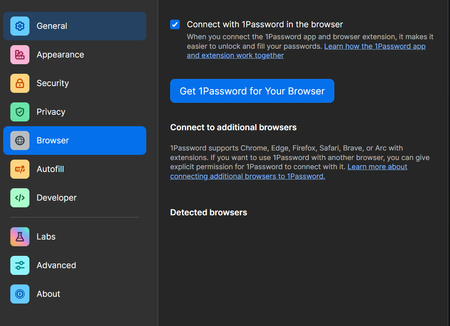
Hey, I'm just wondering, should detected browsers list in 1Password settings be empty? Brave and Edge extensions connect just fine with 1P Windows app, everything seems to be working, but I'm curious how am I supposed to add another browser manually if I wanted to. According to https://support.1password.com/additional-browsers/?windows there should be some buttons visible. Screenshot included. 1Password for Windows Nightly 8.12.18 (81218015) Brave 1Password Nightly – Password Manager 8.12.18.13 Edge 1Password Nightly – Password Manager 8.12.18.13 Windows 11 25H2 26200.832872Views0likes2CommentsI am extremely disappointed with 1Password. They've raised their prices but haven't fixed the bugs
I am extremely disappointed with 1Password. They've raised their prices but haven't fixed the bugs, even though I've written fivedetailed reports about the bugs, and no one has responded. The close button is missing in the upper right corner. Could you please, while increasing your fees, refrain from using a large amount of untested AI code? The fact that this bug exists indicates that your testing is a complete mess. Furthermore, bug reports and customer service requests were submitted 5 business days in advance, but no one has contacted me.50Views0likes1CommentDuplicates shown on cmd + /
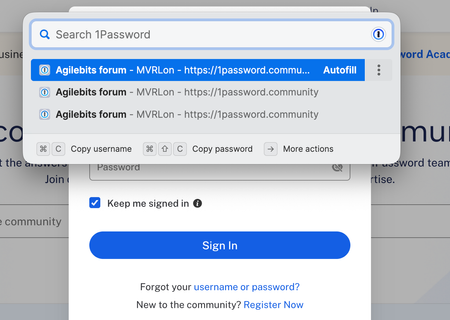
1Password for Mac 8.12.10 (81210036) Firefox 150.0b10 1Password Extension 8.12.4.46 Using CMD + / to fill in a login always shows duplicates of the login - see screenshot. Some sites show 2 some show 3 duplicates. Some websites fill in the entry without prompting - which is as expected if there is only 1 entry for the website. On websites where I have more than one login entry in 1Password, it shows duplicates of all the logins. For example, on the British Airways website I have 3 entries - for 3 different family members - I am shown 6 choices on pressing cmd+/ This forum shows 3 entries, there is only 1 login in 1Password. Again, it's different for different websites - I haven't been able to find a common thread.43Views0likes3Comments
1PW Linux: Attach File / Choose Icon don't work.
Hello 1PW Team, I use the latest Beta 8.10.36 under Fedora 40 KDE (Version 6), installed with RPM package. I have the problem that "attach file" or "choose icon" don't work. When I click on "attach file" or "choose icon" nothing happened. What do you need from me to investigate in this issue? Greeting, Tom 1Password Version: 8.10.36 Extension Version: Not Provided OS Version: Fedora 40 KDE Browser: Brave615Views0likes15Comments
Download link broken for Firefox extension - Nightly Channel
So I'm busy setting up a new personal workstation, and being the middle-aged power user that I am, I've settled in comfortably with the Nightly releases of the various elements of 1Password software that I use. Sadly I was thwarted just now regarding downloading the Nightly release of the Firefox extension, as what I'm certain would be considered the "official" link to download the package leads to an HTTP 404 "File Not Found" error page. That struck me as highly out-of-character for 1P. Steps to reproduce Begin at the "Browser extension" link in the Downloads section of the footer on all public-facing pages on 1Password.com. Canonical URL: https://1password.com/downloads/browser-extension Scroll to just above the footer on this one and click the "Join the Beta" button that links to the article on the support site with all of the details unsuitable for "normies." Canonical URL: https://support.1password.com/betas/?windows#install-a-beta-release-of-the-1password-browser-extension Click on the link for "Firefox (nightly)," which a reasonable personal would expect to trigger a file transfer of the .xpi package containing the extension. Canonical URL: https://c.1password.com/dist/1P/b5x/firefox/nightly/latest.xpi See a 404 error and wonder just how good the drugs are up in Canada, specifically the neighborhoods around the 1Password office, imagining they must be pretty spectacular. Then daydream about living a life that provides opportunities to enjoy them and also not get fired for oversights that lead to onboarding failures and a small (but still non-zero) amount of diminished regard for company/product. 😇 Alright, so that last one was thrown in just to needle you guys, because I know you can take it. This is a bit surprising though, even for a support page, to have a first-party download link for onboarding just not resolve at all. The filename is static, after all, so a pipeline failure to update the link target to a new build name wouldn't seem to be at issue. *shrugs* I would've felt guilty if I just walked away without letting you know that things were awry, having been on the receiving end of one or two of those kinds of butt-chewing sessions by "the boss" earlier in my career and they're no fun, so that's why this thread exists. Also enclosed are my sincere hopes that by the time you're back in the office to read this, that the impulse to want to hold onto the carpet to keep from floating away has subsided. *snickers knowingly while simultaneously bringing his hand up to the side of his face in the universally recognized "call me" gesture* 😃Solved53Views0likes1Comment