Protect what matters – even after you're gone. Make a plan for your digital legacy today.
discussion
455 Topics
#ME-271 feedback: Inline menu hidden in Safari
Hello, I recently noticed that a lot of login forms were no longer showing the 1Password drop-down to select a credential. I believe it is related to this change referenced in the title. Simply put, I prefer the browser extension to select credentials for logging in. It handles OTP codes faster and easier than the system autofill in iOS/iPadOS. Instead, using the system autofill requires extra taps, needlessly populates the clipboard with OTP codes, and generates notifications about the OTP being copied to the clipboard that I'm frequently needing to dismiss. I'm not sure if this is something that can be made optional in the browser extension settings, but I strongly dislike this new behavior and hope that it will be reverted to the previous behavior, or at least made optional. Thank you.Solved32Views0likes3Comments
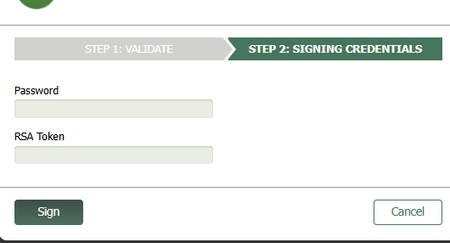
Password and RSA Token fields
Hello, This is a screenshot of the fields I must fill in. If it does not show up it is a "Password" field above an "RSA Token" field. I must obtain the RSA Token passcode from the RSA app and enter it manually. This is the problem: When I use the 1P extension to autofill the password, it autofills the RSA field instead of the Password field. Highly annoying so I would be grateful for any suggestions. This is an iFrame which is why I am using the 1P extension to begin with. When I use MS Edge PW manager it autofills the correct password field so I guess I could use Edge PW manager just for inline webpages and 1P for everything else but I would prefer to use one or the other. (I disabled Edge PW manager when I started using 1P - does anyone have experience using both?) The password for the above field is the same as the password for the main webpage. Ideally it would just autofill but I understand there is a security reason preventing this. I understand MS Edge PW manager does not have the same security issues because it created the browser and can handle tricky field detection better than 3rd party apps. Thank you.12Views0likes2CommentsUnable to Redeem Student offer
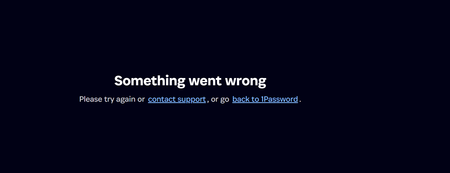
Hi everyone, I'm having trouble redeeming the 1Password offer from the GitHub Student Developer Pack. Every time I go to the official page (https://1password.com/developers/students) and click "Sign in with GitHub", it doesn't seem to work correctly. Instead of staying on the official site, it tries to redirect me to a domain called b5dev.com and then gives me a "Something went wrong" error. I noticed a couple of strange things (see attached screenshots): 1. The GitHub authorization page says the app is "1Password for Student Developers (test)". 2. The redirect URL is pointing to https://b5dev.com instead of 1password.com.21Views0likes1Comment
Need Human Support for Redeeming My 1Password Subscription
I bought a 1Password Individual 3-year subscription from SourceNext, and I want to redeem it on my existing account. However, every time I contact support, I only receive automated replies and no actual human assistance. This is extremely frustrating. I am not asking for anything complicated — I simply need help applying the subscription I already paid for to my existing account. Please stop sending automated responses and have a real support agent handle this issue as soon as possible.43Views0likes2CommentsUnlock 1Password with Passkey
I think it’s maybe at least 3+ years since 1Password team enthusiasticly introduced us to this very important and potent feature. They offered excellent educational blogs and detailed articles that 1Password is so well known for. The project appeared to be already in the works. As I recall, the buzz and anticipation lasted about 1.5 years. Apart from Beta testing by some users, there has been no substantial (if any) communication from Agilebits (that I am aware of) about the project. As paid subscribers, I feel entitled that we be informed of the project status. Please?Solved223Views0likes3Comments1Password Date Format
Hi, Am I missing something or is there no way to change the date format for date fields in 1Password? I personally find the US format is the least intuitive format known to mankind. All my documents like passports have dates in UK format, which means there is a cognitive overhead of converting them over and the possibility of transposing them incorrectly when I have to fill details in manually for example. I wouldn't even mind if you could choose an ISO format like 2025-04-01, as long as it goes from most - > least significant value or least -> most significant value. I don't see English (UK) as a language option, and not sure if Language changes the localisation, or just the language. If this is not possible could I add it as a feature request? Thanks, Michael1KViews3likes20Comments
Secret Key unencrypted within browser developer settings - normal behavior?
Hi there, today I found out, when I go into my developer section of any of my browsers I found out, that 1Password does store a lot about your account: mail-address username vault name creation date of account userUUID using something like Fastmail-extension within 1Password ... and much much more And I also found out, that the Secret Key is stored there unencrypted and visible for anyone with access to this machine (and browser). Even when 1Password is locked, this information is available. How to find it? Just go into developer mode of any browser, search there for the extension and look at databases > accounts > a_by_uuid Is this 'normal' behavior? Within your security white paper you're talking about that it is stored encrypted on all computers. But why is it shown here in clear text?Solved41Views0likes1CommentWhat justifies the huge subscription price increase?
Today I received an email from 1Password with the message of a price increase. Current price: €31.80 EUR / year New price: €43.80 EUR / year This is an enormous price. Can someone from 1Password honestly and without any sales pitch justify this huge price increase? After years of a loyal paying 1Password user, this really makes me look around of alternative options.Solved5.8KViews22likes146Comments1Password.eu is connecting to my.1password.com Amazon Nova AI services. Why?
Hi there, today I found out, that my 1Password.EU service is connecting also to my.1password.com services (not only my.1password.eu). Can you tell me why and why one IP is a https://aws.amazon.com/de/nova/ IP? What are you doing there and why that?Solved85Views0likes4CommentsSnippets going away?
I finally got around to checking out the snippets lab feature, but I can't get it to work. I created a snippet item, but it doesn't get replaced even in something like Notes that I'd expect to be well-supported. Also, the Google Docs file: https://docs.google.com/document/d/1TjWdarf3XH_0vQWpU40Gv0Jk5_Gm49LGYjRDlP6svzQ/edit that's linked from the Settings window pane as documentation has been deleted. Is this feature dying on the vine? 1Password for Mac 8.12.2 (81202037)Solved86Views0likes4Comments