Protect what matters – even after you're gone. Make a plan for your digital legacy today.
feature request
85 Topics
Feature Request: Autofill behaviour option to limit to path and query string
I would love to be able to limit, for example: Entry 1 to https://mysite.com/login Entry 2 to https://mysite.com/settings/api-keys Entry 3 to https://mysite.com/settings/api-keys/2 ...etc. OR Entry 1 to https://staging.mynetwork.com/foobar/login Entry 2 to https://staging.mynetwork.com/bazbat/login ...etc. This would reduce an enormous amount of confusion among my developers and QAs.1View0likes0Comments
Feature Request: “Mirror/Clone Entries” for Cross-Vault Access Without Duplication
Hello 1Password Team, I would like to propose a feature that addresses a practical operational constraint we are currently facing with vault management. Problem Statement In our workflow, we maintain certain login credentials that need to be accessible across multiple vaults. However, due to differing user access permissions between vaults, we are forced to duplicate the same login entries across multiple vaults. This creates the following challenges: Data duplication across vaults Inconsistent updates when credentials change Increased manual effort and risk of outdated information Using a single shared vault is not a viable solution because access requirements vary between teams and users. Proposed Solution: “Mirror” or “Clone” Entries We propose introducing a feature that allows creating view-only mirrored copies of an entry across multiple vaults. Key Concept A single source entry exists. Multiple mirror copies can be placed in different vaults. Mirror entries are view-only. Any update made to the source entry automatically reflects across all mirrors. Suggested Implementation Options Option 1: Mirror Hub (Preferred) Introduce a dedicated vault (e.g., “Mirror Hub”). A designated user or admin manages source entries in this vault. Users can create mirror copies of these entries into other vaults. Ensures centralized control and governance, especially in team environments. Option 2: Flexible Source Location Allow any vault item to act as a source. Users can create mirrors of that item in other vaults. Less centralized, but more flexible. User Experience Suggestion When creating a new item: Add a new option: “Mirror Entry” Selecting this option: Displays a dropdown/list of available source entries (e.g., from Mirror Hub) User selects the item Places a mirror copy in the desired vault Benefits Eliminates duplication of sensitive data Ensures real-time consistency across vaults Reduces operational overhead Maintains strict access control per vault Ideal for team-based environments with segmented permissions Closing Note This feature would significantly improve usability and data integrity for organizations managing multiple vaults with overlapping credential requirements. I strongly believe this would be a valuable addition to 1Password and hope the team will consider it seriously. Thank you for your time and continued innovation.5Views0likes1Comment
"Items in wrong account" - feature request
Hello We have an enterprise account and I see lots of items in my Employee vault that are work related but flagged as being in the wrong account as the email domain is our old company name. Accounts with the login badger@company.com are ok but those with badger@oldcompanyname.com are flagged as in the wrong account in my employee vault. "oldcompanyname.com" and "company.co.uk" (and others) should be considered in the correct account? Is there any way to flag several domains as approved? Is there a way to do this for the enterprise account? If there isn't, can this please be added as a feature requestSolved24Views0likes2Comments
Move Items into "Employee" Vault
Hi, Is there anyway that you can move an item you've created in a shared vault into the Employee vault? I often have to set users up on a system and then put their login and password in a shared vault between me as admin and them. The issue is that sometimes these items ought to really be their eyes only - like payroll. Is there a way that once you've set them up you can move the item from shared to their Employee vault (and I know that I could ask them to do it but they don't)?17Views0likes1Comment
Password expirations
I would like to know if it is possible to do the following on 1password business: Force users to periodically change their 1password account key. The other thing is to force or have a report of the elements of the users to know how old or when they changed their passwords from other logins or configured MFA to know if they are complying with the policies . Any idea? Thank you!17Views0likes1Comment
Add domain toggle for websites
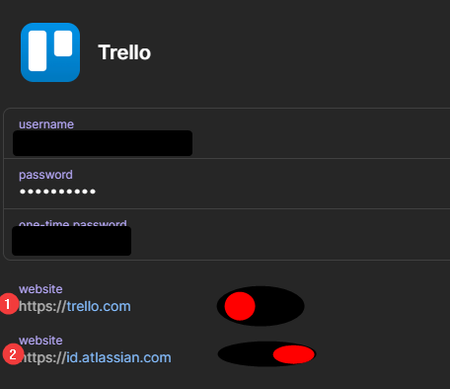
Working in enterprise ICT in a place running Windows means we have multiple accounts with tiered access. Some account credentials are used in multiple places with some things expecting the username with and some without the domain. I.e. thing A will expect the username format of `username` and thing B will expect `domain\username` This would mean you need two 1Password entries to have working autofill. If there was an option in the settings to add a (or multiple) domains and then in each credential there was a toggle (or dropdown) next to each website to specify if it should also get `domain\` (or just a specified prefix) before the username. So in this exquisite drawing signing in to #1 would use `username` and #2 would use `domain\username`Solved23Views0likes1Comment
1 to 1 Sharing
I often have one-off items to share with people at the company that don't necessitate creating a whole vault for. For example, we use an online form design tool that I want the HR person to have access to, but it's an item that lives in the IT vault. I'm not sharing the entire IT vault, but I also don't want to share the item via a sharing link since that creates a new, unsynchronized item. If I update the password or add a note, I have to remember who I've shared the item with and make sure to send them the updated version. It would be helpful if there was a way to share a single item with another person or group, regardless of which vault it lives in. There could be a specialty vault called "Shared With Me" for anything shared like this. There could also be a category or tag for "Items I've Shared". Think OneDrive/SharePoint file sharing. There are company-wide file buckets, and individual employee file buckets. I can easily share a single, editable file out of either of those places with a person or group.61Views2likes3Comments
Permit/block access to vault by IP?
I have a situation where we want to allow access to a specific vault when they're using a given source IP. When coming from that same IP, we would want to block access to all other vaults. When using other IPs, we would want to grant full access. It doesn't appear to be doable now, but I would like to put in a feature request.95Views0likes5CommentsFeature Request: Change the way Favorites work
Current situation is that every favorite a employee creates in a shared vault is shared with everyone in the same permission group. This is confusing for the end-users since they expect that favorites are personal items only visible to them. Expected behaviour is that favorites are strictly related to the user who creates them and are not shared with anybody else. Please consider this for future developments, since this has been asked frequently by the community. Thanks125Views6likes6Comments