Protect what matters – even after you're gone. Make a plan for your digital legacy today.
passkeys
234 Topics
Passkeys stopped working last week - Samsung S25 Ultra
Passkey works on desktop and worked for about 1 year on mobile. However, from last week it stopped working, with Google saying that no passkey was found. Tried changing the settings on "passkeys" off 1password and back to one password and settings on Google Play's password manager... No success.Solved89Views3likes4Comments
1Password for Android cannot become the default Passkeys Manager and other issues
Google Pixel 8 Pro Android 16 1Password for Android 8.11.6 Today, I decided it was the day to setup Passkeys across the supported website/services. Started 1Password for Android - > Watchtower and selected uber.com. Went to the suggested URL after tapping "Use Passkey". URL went to https://account.uber.com/passkeys. Logged in. Was presented the Passkeys page for Uber. Tapped + Create a passkey. Tapped Create a passkey at the popup dialog. Bam! Google Password Manager pops up asking if I would like to create a passkey to sign in to account.uber.com. Cancelled. I remembered doing this already so I went to the following places to check settings. Chrome -> ... -> Settings -> Google Password Manager -> Settings. Checked the following; Offer to save passwords (disabled), Automatically create a passkey to sign in faster (disabled), Auto sign-in (disabled). Chrome -> ... -> Settings -> Autofill Services. Checked Autofill using another service (Enabled). Tapped Android Settings and this is the 3rd place I check next. Alternatively, I can get to it by navigating as per point 3. Android Home Screen -> Settings -> Passwords, passkeys and accounts -> 1Password (Preferred service) - Enabled. Additional services: Microsoft Authenticator (disabled), Google (disabled). Can you put in checks in place please so this doesn't happen? If Google is doing something naughty, can you please work with them to resolve this? Please? Besides this, my experience on Android has been a mixed bag. Some login prompts, 1Password will have no issues popping up offering to autofill. But the MAJORITY of apps and websites, 1Password Autofill simply doesn't do enough. I have to jump back and forth to copy and paste passwords. Please let me know how I can help you folks resolve this.294Views1like3CommentsFeature Request: Show Original Contributor of Items in Shared Family Vaults
Summary Please add a built-in way to display who originally created or contributed an item to a shared vault in 1Password Family. Problem In shared family vaults, it is currently not possible to see who an item originally belongs to once it has been shared. This makes it unclear who owns a specific account, even though the item is visible to everyone in the family. As a workaround, we manually add tags with the name of the person who created or contributed the item. This allows sorting and filtering by owner, but it is manual, error-prone, and easy to forget. Proposed Feature Display non-editable metadata such as: “Contributed by: Name” or “Original owner: Name” This information should remain visible in the item details after sharing or moving an item into a shared family vault. Benefit This makes it easy to understand who an account actually belongs to, even when it is shared for convenience. It improves clarity in family vaults, avoids confusion, and removes the need for manual tagging. Reference Apple Passwords already shows this information for shared items using labels like “Contributed by: Name”, which provides clear ownership at a glance.18Views2likes3Comments
Revisiting minor details of Passkeys
I wanted to generate a few nuanced questions about Passkeys after having using them for a very long time in the context of 1Password. I noticed that certain web sites and apps will ask you to create new passkeys even though I have had passkeys for that site for a very long time. The list includes most of the large companies which have been using passkeys for a long time and were part of the early initiatives to roll out passkeys to the general population. Trying to determine any specific reasons for this (ie maybe signing on with a new device, new os Maint or release, new device hardware type like Windows laptop vs Mac laptop, iPhone , android, etc). Only one passkey is saved off in 1Password but curious on what drives the offer to generate a new passkey as it all appears to work seamlessly for the most part. Is the initial passkey generation dependent upon the hardware specific encryption/decryption chips available on the different devices? Also, after the initial generation of Passkeys is 1Password just merely storing the passkey in its database, thus allowing for the seamless use across multiple devices? Thank in advance for your answers!Solved35Views1like3CommentsPasskey autofill behavior on Crewbloom login (Safari + 1Password)
Hi everyone, I'm seeing some odd behavior with 1Password on Crew Bloom. Basically, this is our staffing & remote hiring platform, by the way! I wanted to check if anyone else has run into this. On Safari (macOS) with the 1Password extension, Passkey or autofill prompts seem to trigger repeatedly when navigating between pages, not just on the login screen. In some cases, autofill doesn't appear at all unless I refresh the page. Is this something related to how CrewBloom implements authentication, or could it be an extension/Safari interaction issue? Curious if others have seen similar behavior on recruiting or HR platforms. Thanks in advance!25Views0likes1Comment"No available sign-in for HealthEquity": passkey not found on Android
This looks like a new issue within the last few days, because it used to work. 🤷🏼♂️ When you log in to the HealthEquity app on Android, it can no longer find the appropriate passkey in 1Password. So you're effectively locked out if you use 1Password & Android. The error message, which now pops up instead of the 1Password "tap passkey to login" button, is: No available sign-in for HealthEquity Sign in another way. If you have a passkey for HealthEquity saved on another device, you can use it by scanning this QR code with the device where the passkey is saved. I'd add a screenshot, but HealthEquity doesn't allow screenshots. 1Password is unlocked and open on the Android device The same passkey, stored in 1Password, works for login via desktop/web browser Have tried rebooting phone, force-stopping and re-opening apps, etc.: no change Does anyone on iOS has the same problem?63Views2likes4Comments
Has the iOS 26 passkey autofill UI changed?
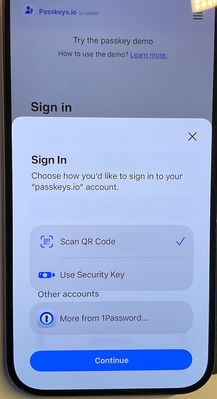
I used to have a 1-click passkey autofill experience on iOS. Now the system defaults to "Scan a QR Code". I have to select 1Password from "Other accounts", press continue, authenticate, and then select the passkey from the 1Password UI. Did something change recently? How can I go back to the more seamless experience I remember? Something like the second image?30Views0likes0Comments
1password constantly prompting for passkey on some sites
When visiting some sites that supports passkey (UpWork.com is one), I often get bugged about passkeys on every single page visit I make. The passkey notice is quite annoying and has to be dismissed constantly. I'm using Safari 26.1 on MacOS, with the 1password extension. Is it supposed to be like this? I know I can disable the prompts for passkey altogether, but I do use it on some sites and it's helpful at times. It's just that some websites cause it to prompt constantly which is very annoying.31Views1like2Comments
Passkeys View Feature
I have 2 physical keys as my main way of protecting my 1Password, primary e-mail, gov identity and computers. Using the software from the key vendor it allows me to view the list of passkeys (now that we have a common thing to call these identities). If I edit the item that has a passkey saved, I'm only able to delete the passkey, but not really able to review any details about the passkey. I saw there is a couple of posts to start allowing passkeys to be exported and exchanged as part of the new Fido Alliance additions to the standards (best I can summarize here). Please let me know if this helps. I'll be happy to expand if needed.14Views0likes0CommentsUnable to create and save a passkey in Costco android app
I am getting the error message when trying to create a passkey in the Costco android app on my Samsung S22 Ultra phone: "Unable to save passkey. For security reasons, 1Password did not save this passkey. The associated URL for this passkey does not match the selected app."Solved673Views6likes13Comments