Protect what matters – even after you're gone. Make a plan for your digital legacy today.
sdk
21 TopicsDeveloper Doc "bugs"
As we are starting to develop utilizing 1Password SDK, I have been finding some "bugs" in the documentation. I would love to see these updated (to help other people). We have been having to create our own internal documentation. From: https://developer.1password.com/docs/sdks/manage-items/#update-an-item Update an item To update an item, fetch the item you want to update, specify the changes you want to make, then pass the updated item to the client.Items.Put function. # Update a field in your item item.fields[0].value = "new_value" item.websites.append( Website( label="my custom website 2", url="https://example2.com", autofill_behavior=AutofillBehavior.NEVER, ), ) updated_item = await client.items.put(item) Website is not a data type: NameError: name 'Website' is not defined From the page: https://developer.1password.com/docs/sdks/concepts/#field-types There is no Data Type "Website", but there is a Data Type "Url", which I also tried, and it does not work either: NameError: name 'Url' is not defined I finally, looking at the source code figured out that I had to do yet another "import": from onepassword.types import ItemField, Website, AutofillBehavior to make this work. Is there other documentation pages that go over all the other parts of "types.py" that tell us when they are used, where it is used, and how to do import for them? Same goes for other code pages (secrets, items, errors, vaults, etc..)101Views0likes4CommentsMeet the 1Password team at KubeCon Europe
KubeCon + CloudNativeCon Europe is coming up on March 23–26 in Amsterdam. A few folks from the 1Password team will be there and we'd love to meet you! If you rely on 1Password for your development work – the CLI in your terminal, Service Accounts in CI/CD, or 1Password Connect in a Kubernetes cluster – we’d love to know if you’re attending and if you’d like to meet the team. We want to hear more about how you’re using 1Password Developer tools, what’s working (and what’s not), and what you’d like to see next. Tell us about the awkward edge cases, security tradeoffs, and the problems you’re solving for today. If you’re a 1Password customer attending KubeCon Europe and you’re up for a short chat with the 1Password team, please let us know using this form: Let us know if you'll be at KubeCon. Not traveling this time? Reply here with what you’re building and how you’re managing human and machine credentials.49Views0likes0CommentsWhat is an Agent Chassis?
Jeff Malnick’s post is confident. It’s also detached from how developers actually ship code today and made me furious.“Agent chassis” boils down to: the script that runs your agent. Fine. But the security layer argument collapses when the tooling underneath is fragmented.Right now you pick between CLI, shell plugins, service accounts, connectors, environments — each with different auth models, rate limits, edge cases, and silent failures. None cleanly support a headless agent workflow. I’ve built workarounds for my workarounds.Agentic coding made this obvious. Agents need real credentials at runtime. Not desktop popups. Not biometric prompts in a terminal.The community built unofficial MCP servers. Anthropic shipped 50+ connectors. 1Password isn’t there.The spec is public. It’s buildable. So—who’s shipping it?60Views0likes1Comment
Automated bi-directional sync between 1Password and AWS Secrets Manager — is this actually possible?
Hey everyone, SRE at a small startup here. We've been using 1Password for a while and overall love it, but we're running into a friction point with our AWS setup that I'm hoping someone has solved. What we're trying to achieve: We want a proper bidirectional sync between 1Password vaults and AWS Secrets Manager. Specifically: 1Password → AWS SM: When someone on the team updates a credential in 1Password, it should automatically propagate to AWS Secrets Manager so our workloads pick it up without anyone having to manually copy-paste things. AWS SM → 1Password: We use AWS Secrets Manager's native auto-rotation for some credentials (RDS passwords, API keys, etc.). When AWS rotates a secret automatically, we'd want that updated value to flow back into 1Password so our employees can always go to 1Password as the single source of truth and get the current credential. On the new "Environments" feature (beta): We noticed the new Environments feature and got excited — it looked like exactly what we needed. But after digging in, it seems pretty limited right now. From what we can tell: There's no SDK support for managing environments programmatically There's no CLI support either (`op` doesn't seem to have environment management commands yet) Everything has to be done through the UI wizard This makes it really hard to automate. We provision new environments dynamically as part of our infrastructure-as-code workflows (Terraform), so we need to be able to create and configure environments programmatically. Is this on the roadmap? Are there any workarounds people are using? The SAML IdP requirement in Environments: Related to the above — the Environments setup wizard seems to require a SAML Identity Provider to be configured for each environment. We use Azure Entra ID as our IdP (federated through AWS Cognito), and we have a single IdP setup that covers all our environments. Is it actually required to have a separate SAML IdP per environment, or is there a way to reuse a single IdP across multiple environments? The wizard flow makes it seem like each environment needs its own IdP configuration, which would be a significant blocker for us — we can't dynamically spin up new IdP configurations every time someone creates a new environment in our platform. If this is a hard requirement, it basically rules out Environments for our use case entirely, since we'd need to automate IdP provisioning as part of environment creation, which is a whole other can of worms. Summary of questions: Has anyone built a reliable bidirectional 1Password ↔ AWS Secrets Manager sync? Especially the AWS SM → 1Password direction for auto-rotated secrets? Is there any programmatic/API access for Environments (SDK, CLI, REST API) that isn't documented yet, or is it genuinely UI-only right now? Is a separate SAML IdP per environment actually required, or can you reuse one IdP across environments? Thanks!75Views0likes2Comments
Python 3.14 and SDK example.py
The python example.py script worked with python 3.13 after following the setup instructions. For python 3.14 the following error occurs: # Connects to 1Password. client = await Client.authenticate( auth=token, # Set the following to your own integration name and version. Exception has occurred: NameError name 'Client' is not defined Has the example.py script been run under python 3.14? Should the script not have this error with python 3.14?Solved80Views0likes5CommentsService Account Rate Limits: 15+ Minutes Block, No Backoff Duration Shown
Environment: - 1Password CLI (latest) - Service Account (not personal account) - Linux systemd service using LoadCredentialEncrypted - op inject to load 2 secrets at startup --- The Problem My systemd service uses a 1Password service account to inject 2 secrets at startup via op inject. While debugging an unrelated configuration issue, I restarted the service approximately 15 times over 10 minutes. This triggered a rate limit that has now persisted for over 15 minutes with no sign of clearing. The Error Message [ERROR] 2026/01/31 22:35:22 Too many requests. Your client has been rate-limited. Try again in seconds Note the blank where the number should be — there's no indication of how long to wait. Observed Behavior ┌──────────────────┬────────────────────────────────────┐ │ Operation │ Result │ ├──────────────────┼────────────────────────────────────┤ │ op whoami │ ✅ Works (authentication succeeds) │ ├──────────────────┼────────────────────────────────────┤ │ op vault list │ ❌ Rate limited │ ├──────────────────┼────────────────────────────────────┤ │ op inject │ ❌ Rate limited │ ├──────────────────┼────────────────────────────────────┤ │ op read op://... │ ❌ Rate limited │ └──────────────────┴────────────────────────────────────┘ This indicates the rate limit is applied per-operation-type — authentication endpoints work fine, but any vault/item access is blocked. Issues 1. Rate limit is extremely aggressive — ~15 requests over 10 minutes triggered a 15+ minute block. This is a typical debugging session, not abuse. 2. No backoff duration shown — The error says "Try again in seconds" but the actual number is missing. I have no idea if I should wait 1 minute or 1 hour. 3. No way to check status — There's no op rate-limit-status command or API to check current quota/reset time. 4. Service accounts should have higher limits — These are designed for automation and CI/CD where rapid retries during debugging are expected behavior. 5. Disproportionate impact — A brief debugging session can take down production services for an extended period with no recourse. Expected Behavior - Show the actual backoff duration in the error message - Faster reset — 1-2 minutes, not 15+ - Higher thresholds for service accounts — differentiate from potential abuse patterns - Rate limit status endpoint — let us query current quota and reset time - Graduated response — warn before hard blocking, or use exponential backoff instead of a cliff Workaround Wait and hope. There's no way to know when access will be restored. --- Request: Can someone from the 1Password team clarify the rate limit policy for service accounts and whether the blank duration in the error message is a known bug?87Views0likes2Comments📣 - Local App Authentication in the SDKs
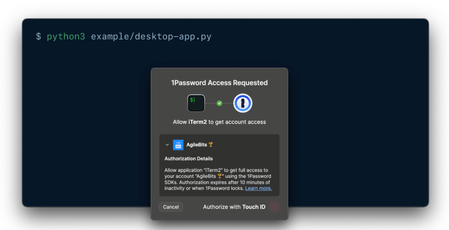
Hi all, Just wanted to drop a quick note about the updated SDKs for Python, Go and Javascript. We recently introduced another beta enabling desktop applications to request an item from 1Password and then 1Password presents an authentication to the end user. Learn more here 👉 https://developer.1password.com/docs/sdks/desktop-app-integrations What do you all think about this? How is it going for you? Have you had a chance to give it a try? Here's a quick video, I recorded introducing the idea and giving a quick example of it in action! Let us know what you think! Thanks! Phil & the 1Password Team! Video not displaying? Watch it here.298Views1like2Comments
Unofficial 1Password SDK for Rust
For some small projects I wanted to use a secure way of handling secrets in my backend code, without taking out the big guns and adding a ton of infrastructure overhead (e.g: Azure Key Vault). After some "research" and diving into the op cli options and official Python, Javascript and Go SDKs, I thought I could probably build a simple wrapper around the core SDK library used in the Python SDK. After some trial implementations across multiple rust projects I thought it would be a nice addition to 1passwords ecosystem. If you're interested using the SDK head over to the github page at: https://github.com/Trendium-Labs/corteq-onepassword Curious about the security and inner workings? it's documented at https://github.com/Trendium-Labs/corteq-onepassword/blob/main/docs/ARCHITECTURE.md Please share your feedback, thoughts and use cases to improve this unofficial SDK. Ps:1P_Phil and team have been notified to see if and how to take this unofficial approach forward. Happy holidays! Brian75Views0likes0CommentsIntroducing 1Password SDKs for Desktop Integrations
We’re excited to announce new authentication capabilities in the 1Password SDKs! Developers can now build integrations that authenticate directly through the 1Password desktop app using the same trusted methods users already know —Touch ID, their account password, or other supported options. 🏗️ What this unlocks: Native and seamless integrations: Build integrations that connect directly with the 1Password desktop app using the SDK. It’s a secure, native way to integrate with 1Password — no extra setup or dependencies required. Human-in-the-loop workflows: Enable user-scoped authentication in your integrations to support secure, approval-based workflows that keep users in control. Easy to build and adopt: Simplifies integration setup and makes authentication effortless for end users. Now available in public beta for macOS and Linux in the SDKs for Go, JavaScript, and Python. Video not displaying? Watch it here. 💬 Share feedback, get swag We’d love to hear how this feature performs in your integrations — is it reliable and easy to use in your workflows? What would you like to see next? 📖 Read the docs to get started 🧢 The first 10 developers to share feedback on the 1Password Developer Community Hub by November 30th will receive exclusive 1Password swag. Be sure to tag your post with #beta-sdk-desktop-integrations.291Views3likes0Comments
Desktop Integration Cannot Find App
Hi All, Just started testing out the Desktop Integrations approach and seem to be running into an error with actually loading the app itself. Python is raising a FileNotFoundError and seems to not be able to find a library file in my 1Password Desktop application. I'm not sure how readily I can share further logs without leaking project details or system specifics, but the files that the integration is erroring on are: lib_path = '/Users/wileydavis/Applications/1Password.app/Contents/Frameworks/libop_sdk_ipc_c'+11 │ │ │ │ locations = [ │ │ │ │ │ '/Applications/1Password.app/Contents/Frameworks/libop_sdk_ipc_client.dylib', │ │ │ │ │ '/Users/wileydavis/Applications/1Password.app/Contents/Frameworks/libop_sdk_ipc_c'+11 │ │ │ │ ] │ │ │ │ os_name = 'Darwin' #beta-sdk-desktop-integrationsSolved126Views0likes4Comments