Level up your business security with free, on-demand training and certification. Explore 1Password Academy today →
sso
30 Topics
Error when onboarding new SSO User
1 Password for Enterprise SSO Method Entra Hosted SCIM Managed Group When I add a new user to a group to automatically onboard them now, when the user gets to the email verification step, that user gets "An Unknown Error Occurred" "Contact your account administrator for help.". below that in the response is "Error(SecureChannelCreateSession(Fetch)) \r\n at /builds/dev/cc/confidential-computing/crates/internal/cc-secure-channel-client/src/lib.rs:445" This did not happen with the first user to onboard through this group, but it has happened with all others. After 48 hours I was able to re-invite one of the users and push them through, but I want to know how to avoid this in the future.6Views0likes0Comments
op from a remote docker container?
Hi, We're using (linux) ssh remotely to connect to an on-prem bastion. Behind the bastion is a docker container we use for ansible deployment. There are several playbooks that need environment variables exported in order to run. It would be nice to pull these in on the remote container using op instead of the current cut/paste workflow. Is it possible to authorize the terminal locally with op signin and then schmooze that authorization into the remote docker container with ssh -A or something to allow the container to do something like: TOKEN=$(op read "op://Dev Secrets/GitHub Token/password") ? Our 1P accounts are issued through an enterprise and we use SSO for login with our on-prem IDP so there may be some restrictions with methods available (eg: service account token)Solved29Views0likes1CommentSingle Sign-on password sharing to Personal Account
To minimise the number of recoveries for our 1Password at Work accounts, we'd like to be able to permanently share the password for our Single Sign-on account to our linked 1Password at Home account. This could be optional functionality for an organisation to enable. It could be tightly controlled within the application to minimise the security implications. Or it could be more broadly available within 1Password at Work accounts where you could share any item to your Our Family->Private vault.31Views0likes2CommentsExtension Gets Stuck Saying "Unlocking..."
Within the past week, most of the users at our company have started experiencing an issue with the 1Password browser extension in both Chrome and Edge. After signing into the extension using SSO, the extension icon changes to show that it is unlocked — the lock icon disappears — but when the user clicks the extension to open the menu, it gets stuck on “Unlocking…” and never fully opens. We have found a temporary workaround, but it is inconsistent and not practical for regular use: Click the SSO button to unlock 1Password. After the SSO tab opens and closes, immediately click the 1Password extension again before the lock icon disappears. The extension briefly still shows the SSO button, then successfully unlocks and displays the menu. However, this only works temporarily. If the user tries to open the extension again on the same browser tab, it goes back to being stuck on “Unlocking…”. If the user switches to a different tab before opening it again, it appears to remain unlocked for the time being. This is affecting both Chrome and Edge. So far, the few users we have who are using Firefox do not appear to be affected. However, most of our users do not have have access to Firefox, so switching browsers is not a practical workaround for us. This also seemed to start around the time Chrome updated to Version 147.0.7727.102, which resolved the previous 1Password-related issue we were seeing, but this new issue started occurring afterward. Current versions in our environment: Chrome: 147.0.7727.103 Edge: 147.0.3912.86 Also worth noting: we do not have the 1Password desktop app installed on our users’ computers. They are using only the browser extensions. Has anyone else started seeing this behavior recently, especially in Chrome or Edge with SSO-only extension usage? Are there any known workarounds, policy settings, extension settings, or browser flags that may help resolve or mitigate this?Solved251Views0likes7Comments
Edge Authentication Window when using Microsoft SSO
Hello! We have configured Microsoft/EntraID SSO for login to 1Password. The users are logged in to the Windows PC with an Active Directory User - the Users are synchronized to EntraID, where SSO with 1Password is configured. Recently we are experiencing the issue, that for every first 1Password unlock after a PC restart, when we click "Login with Microsoft" in 1Password, a Browser window opens, asking for the Microsoft 365/EntraID login credentials. The login to 1Password is successful anyway, either if we enter the credentials in this window, or if we do not enter any credentials and close the window. How can we prevent that Browser window asking for credentials? Is there something we need to configure on 1Password side? Thank you and best regards, Michael15Views0likes0Comments
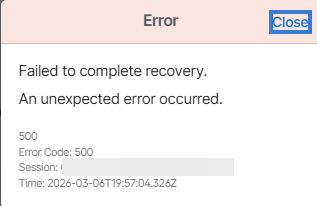
Cannot Complete User Recovery
Hello, We have a user that was put into recovery and completed their steps via email. However, when an admin tries to complete the recovery, this error pops up. This has been consistent over the past 48 hours for this specific user. We use Azure SSO with a SCIM. Any help would be greatly appreciated.Solved64Views0likes2Comments
Duo SSO Login Issue
I recently setup Duo SSO. I have one user who missed the deadline to sign in before they needed recovery. The issue I'm having is that during that time they had their email change (name change). And I can't move forward with the recovery because their email on 1Password is different from their email in Duo. As far as I can tell they are essentially locked out of their account and I can't figure out a way to change their email in 1Password to make it match. Thanks, -Bryan30Views0likes0Comments
Microsoft Entra ID SSO issue
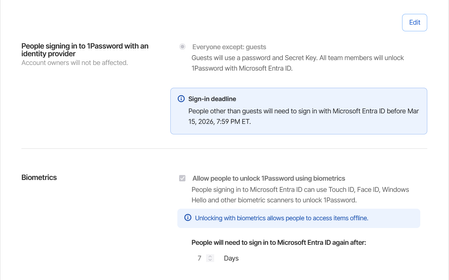
We have recently migrated all our users over to using Microsoft Entra ID SSO. It works fine except every time they close the app or shutdown their computer, it asks them to login using SSO. We have a set of employees who do not always have a connection available. They go from site to site and some basements where they need to go don't have network or wi-fi. When that happens, they are unable to use 1password. Keep in mind that most of the time when they access these places they are escorted by security to go down in the basements and it's wasting their time as well as the security employee. We have it set to ask the Entra password every 7 days. Expected behavior: if I close the app or restart the computer, the token should still be valid. Current behavior: Every time I close the app or restart the computer, I have to login to the microsoft account again.136Views1like1Comment