Protect what matters – even after you're gone. Make a plan for your digital legacy today.
windows
38 TopicsPrompted every time I need to sign a git commit or tag
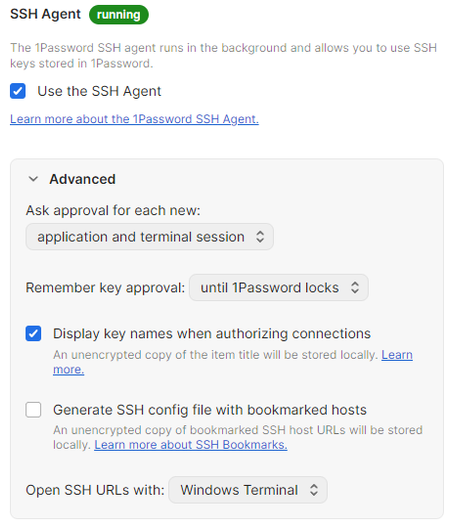
I have 1Password set up to sign git commits and tags in both Windows and WSL (I use the latter most for development). Starting a few months ago but getting increasingly frustrating (especially when I rebase a lot of commits), I'm prompted every time I need to sign. My ~/.gitconfig is set up like so (relevant settings shown): [user] signingkey = ssh-ed25519 PUBKEY [core] sshCommand = ssh.exe [gpg] format = ssh [gpg "ssh"] program = "/mnt/c/Users/USERNAME/AppData/Local/Microsoft/WindowsApps/op-ssh-sign-wsl.exe" [commit] gpgsign = true [tag] gpgsign = true `ssh-add -L` (both the ELF executable in WSL as well as running the PE/COFF `ssh-add.exe`) shows my ssh auth and signing keys. 1Password - the desktop app - is also configured to only prompt when 1Password is locked or after 4 minutes. I get this same prompt-on-every-use behavior whether 1Password is open and unlocked or not. Works as expected for my browser extension, though. I found a post from about a year ago that someone resolved a similar behavior by re-installing 1Password. I may try that, but would rather hear from a dev to troubleshoot the issue in its current state so a proper fix could be made so this doesn't keep happening after winrot or whatever is causing this happens again to anyone.8Views0likes0CommentsSSH agent isn't working (Windows 11)
I can't use my vault's SSH keys on my terminal. I've reinstalled multiple times and followed the https://developer.1password.com/docs/ssh/get-started/, but I can't make it work correctly. My 1Password config is set up as follows: I've disabled the OpenSSH Authentication Agent (the screenshot is in spanish) My ~/.ssh/config file: Host * IdentityAgent "~/.1password/agent.sock" My ~/.gitconfig file: [core] sshCommand = ssh.exe autocrlf = input [user] email = {email} name = {user} signingkey = ssh-ed25519 AAA[...] [gpg] format = ssh [gpg "ssh"] program = C:\\Users\\{user}\\AppData\\Local\\1Password\\app\\8\\op-ssh-sign.exe [commit] gpgsign = true Whenever I run ssh-add -L my vault's SSH keys are shown, but I can't seem to make it work with GitHub or connect to any SSH connection. ❯ ssh-add -L ssh-ed25519 AA[...] Authentication & Signing (Git) ssh-ed25519 AA[...] Authentication ❯ ssh -Tv git@github.com OpenSSH_for_Windows_9.5p1, LibreSSL 3.8.2 debug1: Reading configuration data C:\\Users\\{user}/.ssh/config debug1: C:\\Users\\{user}/.ssh/config line 1: Applying options for * debug1: Connecting to github.com [140.82.116.4] port 22. debug1: Connection established. debug1: identity file C:\\Users\\{user}/.ssh/id_rsa type -1 debug1: identity file C:\\Users\\{user}/.ssh/id_rsa-cert type -1 debug1: identity file C:\\Users\\{user}/.ssh/id_ecdsa type -1 debug1: identity file C:\\Users\\{user}/.ssh/id_ecdsa-cert type -1 debug1: identity file C:\\Users\\{user}/.ssh/id_ecdsa_sk type -1 debug1: identity file C:\\Users\\{user}/.ssh/id_ecdsa_sk-cert type -1 debug1: identity file C:\\Users\\{user}/.ssh/id_ed25519 type -1 debug1: identity file C:\\Users\\{user}/.ssh/id_ed25519-cert type -1 debug1: identity file C:\\Users\\{user}/.ssh/id_ed25519_sk type -1 debug1: identity file C:\\Users\\{user}/.ssh/id_ed25519_sk-cert type -1 debug1: identity file C:\\Users\\{user}/.ssh/id_xmss type -1 debug1: identity file C:\\Users\\{user}/.ssh/id_xmss-cert type -1 debug1: identity file C:\\Users\\{user}/.ssh/id_dsa type -1 debug1: identity file C:\\Users\\{user}/.ssh/id_dsa-cert type -1 debug1: Local version string SSH-2.0-OpenSSH_for_Windows_9.5 debug1: Remote protocol version 2.0, remote software version 133e47a51 debug1: compat_banner: no match: 133e47a51 debug1: Authenticating to github.com:22 as 'git' debug1: load_hostkeys: fopen C:\\Users\\{user}/.ssh/known_hosts2: No such file or directory debug1: load_hostkeys: fopen __PROGRAMDATA__\\ssh/ssh_known_hosts: No such file or directory debug1: load_hostkeys: fopen __PROGRAMDATA__\\ssh/ssh_known_hosts2: No such file or directory debug1: SSH2_MSG_KEXINIT sent debug1: SSH2_MSG_KEXINIT received debug1: kex: algorithm: curve25519-sha256 debug1: kex: host key algorithm: ssh-ed25519 debug1: kex: server->client cipher: chacha20-poly1305@openssh.com MAC: <implicit> compression: none debug1: kex: client->server cipher: chacha20-poly1305@openssh.com MAC: <implicit> compression: none debug1: expecting SSH2_MSG_KEX_ECDH_REPLY debug1: SSH2_MSG_KEX_ECDH_REPLY received debug1: Server host key: ssh-ed25519 SHA256:+DiY3wvvV6TuJJhbpZisF/zLDA0zPMSvHdkr4UvCOqU debug1: load_hostkeys: fopen C:\\Users\\{user}/.ssh/known_hosts2: No such file or directory debug1: load_hostkeys: fopen __PROGRAMDATA__\\ssh/ssh_known_hosts: No such file or directory debug1: load_hostkeys: fopen __PROGRAMDATA__\\ssh/ssh_known_hosts2: No such file or directory debug1: Host 'github.com' is known and matches the ED25519 host key. debug1: Found key in C:\\Users\\{user}/.ssh/known_hosts:3 debug1: ssh_packet_send2_wrapped: resetting send seqnr 3 debug1: rekey out after 134217728 blocks debug1: SSH2_MSG_NEWKEYS sent debug1: expecting SSH2_MSG_NEWKEYS debug1: ssh_packet_read_poll2: resetting read seqnr 3 debug1: SSH2_MSG_NEWKEYS received debug1: rekey in after 134217728 blocks debug1: get_agent_identities: ssh_get_authentication_socket: No such file or directory debug1: Will attempt key: C:\\Users\\{user}/.ssh/id_rsa debug1: Will attempt key: C:\\Users\\{user}/.ssh/id_ecdsa debug1: Will attempt key: C:\\Users\\{user}/.ssh/id_ecdsa_sk debug1: Will attempt key: C:\\Users\\{user}/.ssh/id_ed25519 debug1: Will attempt key: C:\\Users\\{user}/.ssh/id_ed25519_sk debug1: Will attempt key: C:\\Users\\{user}/.ssh/id_xmss debug1: Will attempt key: C:\\Users\\{user}/.ssh/id_dsa debug1: SSH2_MSG_EXT_INFO received debug1: kex_input_ext_info: server-sig-algs=<ssh-ed25519-cert-v01@openssh.com,ecdsa-sha2-nistp521-cert-v01@openssh.com,ecdsa-sha2-nistp384-cert-v01@openssh.com,ecdsa-sha2-nistp256-cert-v01@openssh.com,sk-ssh-ed25519-cert-v01@openssh.com,sk-ecdsa-sha2-nistp256-cert-v01@openssh.com,rsa-sha2-512-cert-v01@openssh.com,rsa-sha2-256-cert-v01@openssh.com,ssh-rsa-cert-v01@openssh.com,sk-ssh-ed25519@openssh.com,sk-ecdsa-sha2-nistp256@openssh.com,ssh-ed25519,ecdsa-sha2-nistp521,ecdsa-sha2-nistp384,ecdsa-sha2-nistp256,rsa-sha2-512,rsa-sha2-256,ssh-rsa> debug1: SSH2_MSG_SERVICE_ACCEPT received debug1: Authentications that can continue: publickey debug1: Next authentication method: publickey debug1: Trying private key: C:\\Users\\{user}/.ssh/id_rsa debug1: Trying private key: C:\\Users\\{user}/.ssh/id_ecdsa debug1: Trying private key: C:\\Users\\{user}/.ssh/id_ecdsa_sk debug1: Trying private key: C:\\Users\\{user}/.ssh/id_ed25519 debug1: Trying private key: C:\\Users\\{user}/.ssh/id_ed25519_sk debug1: Trying private key: C:\\Users\\{user}/.ssh/id_xmss debug1: Trying private key: C:\\Users\\{user}/.ssh/id_dsa debug1: No more authentication methods to try. git@github.com: Permission denied (publickey). One thing I noticed is that the folder .1password with the agent.sock file is not being created on my %USERPROFILE% folder. ❯ cd ~ && lsd -la | findstr ".1password" {empty} I installed lsd (chocolatey) on windows btw637Views0likes6CommentsIntroducing: Desktop auth for SDKs & 1Password Environments access for CLI, SDK & Service accounts
Today, we're introducing two new features to help developers get secrets to the right place at the right time, without sprinkling them across files, repos, and build logs. Programmatically read 1Password Environments (read‑only, now in beta) If you store project environment variables in 1Password Environments, you can now read them at runtime via the 1Password CLI and SDKs. That means tools can pull secrets when they’re needed, instead of maintaining .env files or managing long‑lived secret syncs. A few places this shines: CI/CD workflows: Retrieve and inject .env variables during builds using a service account. Containers/Kubernetes: Apps read connection strings at startup. Local + AI-assisted tooling: Scripts/Make targets fetch tokens on demand while keeping secrets out of the model context. Video not displaying? Watch it here. Desktop authentication for 1Password SDKs Fresh out of beta, SDK integrations can now authenticate through the 1Password desktop app with a biometric/password prompt. Sessions inherit the signed‑in user’s access and time out after 10 minutes of inactivity (or when 1Password locks). This unlocks higher‑impact workflows, including full vault management (create/read/update/delete/list), managing vault permissions, and batch item operations for teams operating at scale. Video not displaying? Watch it here. Check out the details For the full details, read the launch post. Questions, edge cases, or wish‑list items? Drop them below – we’re listening.84Views0likes0Comments
1Password as virtual Smartcard
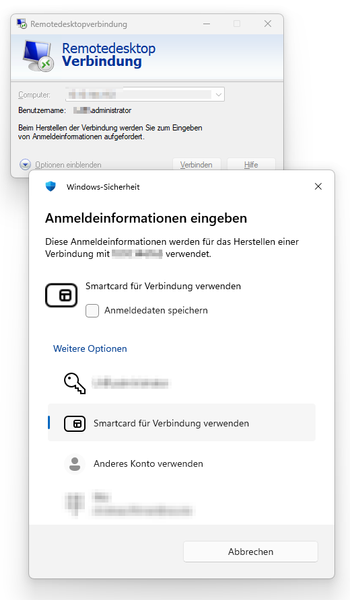
Hello the Januar Microsoft Update and general security issues that may arise when using autotype features to user/password prompts made me think what would be a solution for cases where the current 1Password can't replace passwords. https://4sysops.com/archives/autofill-credentials-into-the-windows-authentication-dialog-fails/ for 1Password autotype (drag&drop and "quickaccess"). Just because 1Password is a modern "WindowsApps" application, it can't have the required `uiAccess='true'` by default. Having a process running elevated as admin is not a solution for me either. In any case, the risk of autotype accidentally typing into the wrong window arises when applications open or close at the wrong time. Therefore, Autotype is not a very secure solution, but sometimes it is required. In some environments, the solution might be for 1Password to provide a virtual smartcard, while in others it might be a virtual Fido2 device. I think there are security design limitations that will prevent a "vFido2" device I guess. In this case, how about using a virtual smartcard so that the option "Use Smartcard for this connection" ("Smartcard für Verbindung verwenden") can be selected? As https://learn.microsoft.com/en-us/windows/security/identity-protection/virtual-smart-cards/virtual-smart-card-get-started there might be a way to shift that to 1Password to be able to use the Smartcards on different computers, share them and maybe make a central deployment for that 😛 Don't use the following Microsoft Virtual Smartcard in every secure environment, but for some it may be enough. It uses TPM so it already has some security measurements builtin, but it is not un-/replugable like a physical one. So here you got a screenshot about what microsoft describes as a default virtual smartcard creation including creation of a virtual reader on the page linked before: How I think it could work when 1Password had a virtual Smartcard and a virtual Reader: Install the virtual reader like the "ssh agent" installation process is done. Create an emtpy virtual smartcard (maybe with 15 slots). Now the default provisioning process could start to generate the keys through Microsoft certmgr Alternatively the virtual SmartCard could be shared through 1Password with someone that is in charge of configuring it. Maybe there might be a requirement for redirected virtual smartcard readers as well so that you could use them on virtual machines and terminalserver after doing rdp to a target without installed 1Password but only with that driver. 1Password should be in charge of changing the smartcards in the virtual smartcard reader and will remove the smartcards when requested by user/time/lock/standby24Views0likes0Comments
SSH Agent Permission Denied for Multiple User Accounts on Same Machine
Hi, I think this is basically the same issue reported here (but not resolved): SSH Agent Permission Denied for Multiple Users on the same machine over RDP | 1Password Community but without the RDP aspect. I echo that user's sentiments: 1Password being an SSH Agent is awesome and I use it daily. My situation is this: I have a laptop that I use for personal and work related development. To keep these activities separate I have two logins on this computer. One for work, one for personal. Up until I got this new laptop (a month ago) I didn't have the separate logins so this wasn't an issue. But now it's an issue. After booting the laptop, whichever account I log into first will have no issues using the SSH Agent (`ssh-add -l` shows the expected available SSH keys). But then when I login to the second account, `ssh-add -l` shows `Error connecting to agent: Permission denied`). If I switch back to the first account, it continues to work fine. If I logout of the first account, the second account (which is now the only one logged in) continues to give the same error. Only rebooting the system and logging into that account first will let me use the SSH Agent with it. Any idea how to solve this? I'd really like for this to just work! 1Password Version: 8.12.1 Windows Version: 11 Pro 25H2 26200.7623Solved64Views0likes3Comments
ssh agent popup does not appear
Hello, I've been using 1p ssh agent on multiple platforms, but on windows in particular it's been giving me trouble. For whatever reason, in powershell, the ssh agent appears to be running, I can run a ssh-add -l and it gives me the keys I expect including my github key: but if I run a git clone or git pull, the request fails with a permission denied error: The 1 password prompt for key authorization never shows up and so no valid key is presented to the server. Any suggestions on how to debug this properly? This key is valid and I use it on osx and Linux without issue.18Views0likes0Comments
WSL2 + 1Password CLI
I have a WSL2 system set up with NixOS where I used to be able to use shell plugins (primarily the `gh` tool for GitHub) - but today it is not working, throwing an error message: [ERROR] 2025/12/27 22:35:25 Shell Plugins can only be used with the 1Password app integration enabled. To learn more about this feature, check out: https://developer.1password.com/docs/cli/about-biometric-unlock/ This used to work - but unfortunately I don't know exactly _when_ it stopped working, I use the VM sporadically. Config: $ op plugin inspect ? Choose which CLI configuration to inspect: gh (GitHub) GitHub CLI Configured Aliases ✔ Alias for "gh" configured ✔ Aliases sourced (/home/gac/.config/op/plugins.sh) Configured Credentials ✔ Configured as global default: CREDENTIAL TYPE ITEM VAULT GitHub Personal Access Token GitHub Personal Access Token Private Versions: $ uname -a Linux wsl 6.6.87.2-microsoft-standard-WSL2 #1 SMP PREEMPT_DYNAMIC Thu Jun 5 18:30:46 UTC 2025 x86_64 GNU/Linux $ nixos-version 25.11.20251226.f560cce (Xantusia) $ op --version 2.32.0 $ wsl.exe --version WSL version: 2.6.3.0 Kernel version: 6.6.87.2-1 WSLg version: 1.0.71 MSRDC version: 1.2.6353 Direct3D version: 1.611.1-81528511 DXCore version: 10.0.26100.1-240331-1435.ge-release Windows version: 10.0.26200.7462 If biometric login is a hard requirement then this is problematic to say the least as this is a desktop - there is no Windows Hello and no biometric capability. The documentation page does redirect to a different page about app integration, however this seems to only cover common use cases such as "I am using Windows and I want access to 1Password from Powershell" or "I have macOS and want access from the native terminal with `bash`/`zsh`". There doesn't seem to be any advice for running within a WSL2 virtual machine where 1Password is running _outside_ of the VM and I need access for shell plugins _inside_ the VM... Any tips or advice?116Views0likes0CommentsHow to add a custom port to SSH bookmarks
I've recently discovered 1Password's support for SSH bookmarks, which is nice. However one of my servers does not use SSH port 22 but a different one. How can I add this custom port to a bookmark so that the generated SSH config file in ~/.ssh/1Password does contain the port info?Solved676Views1like9Comments
Cannot find "Destinations" tab for mounting secrets to local .env files
I am trying to use the feature "Access secrets from 1Password through local .env files" but I cannot find the "Destinations" tab. What I have done: Enabled "Show 1Password Developer experience" in Settings > Developer Enabled "Record and display activity" I can see and use the AWS Secrets Manager integration What I expected: According to the documentation, there should be a "Destinations" tab that allows me to mount secrets to a local .env file. What I see: The "Destinations" tab does not appear anywhere in the interface. I only see the AWS Secrets Manager integration option. Environment: 1Password version: Latest OS: Windows Account type: Individual Could you please help me understand how to access the Destinations feature, or let me know if this feature has been moved or deprecated? Thank you.57Views0likes1Comment
SSH agent requires restart between every GitHub request
I've been using the 1Password SSH agent to sign commits and authenticate with GitHub for months without any issues. Today, I started experiencing intermittent SSH timeouts when trying to pull, fetch, or push: ssh: connect to host github.com port 22: Connection timed out fatal: Could not read from remote repository. Please make sure you have the correct access rights and the repository exists. At first I assumed this was a GitHub outage, but I noticed that when 1Password prompted me to approve the SSH key, the request would succeed. After a while, the timeouts would return. I changed "Remember key approval" from 12 hours to "until 1Password quits." This helped, but now I have to restart 1Password and re-approve the key between every single Git request, otherwise it times out again. Environment: Windows 11 Affects Git CLI, Git Fork, and VS Code Commit signing with the same key still works fine What I've tried: Changing "Remember key approval" to "until 1Password quits" Restarting 1Password (temporarily fixes it for one request) Restarting my computer Has anyone else run into this? Any suggestions would be appreciated.154Views1like2Comments