Protect what matters – even after you're gone. Make a plan for your digital legacy today.
Forum Discussion
r8ders2k
4 years agoFrequent Contributor
Unlocking 1Password Safari icon
Here's an observation...
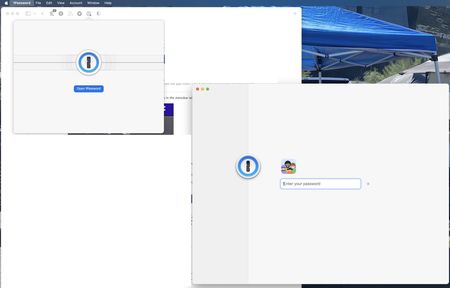
Safari was opened and the 1P Safari icon was locked. I then launched the 1P macOS app and unlocked it. Went back to Safari, clicked on the locked 1P Safari icon and it fla...

Anonymous
4 years agoHey, r8ders2k!
First off, thank you so much for helping push the boundaries of 1Password and jumping in on the Early Access release.
1Password for Safari is using the newest cross-platform extension APIs that Apple has to offer. But, unfortunately, those APIs don't yet allow us to open the popover programmatically. So to ensure you can see 1Password unlocked in Safari, we need to keep the popover open while you unlock the 1Password for Mac. If you're using Touch ID to unlock, there's only a dialog, but if you're on a Mac without Touch ID, we show you the entire main app to give you a place to enter your account password.
I do have an issue filed with Apple to help us make this a smoother user experience, but in the meantime, you'll see two windows when "Integrate with 1Password app" is enabled in the 1Password for Safari settings. This should only happen while unlocking.



