Protect what matters – even after you're gone. Make a plan for your digital legacy today.
android
1235 Topics
Unable to create and save a passkey in Costco android app
I am getting the error message when trying to create a passkey in the Costco android app on my Samsung S22 Ultra phone: "Unable to save passkey. For security reasons, 1Password did not save this passkey. The associated URL for this passkey does not match the selected app."Solved638Views6likes13Comments
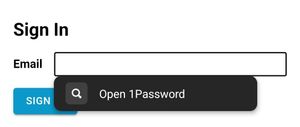
Autofill suggestions only show "Open 1Password"
Dave, I've noticed something new over the last few days. Autofill is still working, but sites that used to prompt with specific logins now prompt only with "open 1password". It works to choose that, but takes extra steps. I am not certain yet if it is all sites, but i dont think I have seen the usual prompt since this started. This is from seeclickfix.com Thanks Shawn96Views1like6CommentsHow to add an android app to "Passwords" category
I am saving a password for my Secure Folder app on my Samsung Phone which doesn't require a username. However, when I save it, the "login" category is automatically applied to it, any way that I can change it to the "Passwords" category. I can't seem to create an item manually with the "Passwords" category since I need to link it to an Android app and not a website. Any help?15Views0likes1Comment
Unable to update payment method and subscription payment keeps failing
Hi! I am located in Colombia and for almost three weeks now, the payment for my account has been repeatedly declined. I contacted my bank and checked my card, and they confirmes that everything is fine on their side and that they are not blocking the transaction. Because of this, i tried to updating my payment method through my account. However, evrytime I try to update the card, the page just keeps loading and never finishes. I have tried several times and in different moments, but the result is always the same, so i have not been able to update my paymnet detauls. Could you please help me understand why my payments are being rejected and how can I successfully update my payment methps? Thank you in advance for your help!11Views0likes1CommentAndroid AutoFill issues
This is not resolved, I used to be a strong advocate for 1Password, but I honestly can't say that anymore. As you've grown and spread your wings way to far, you've lost what was core to 1Password and am extremely disappointed as I always was fine paying for a "premium" service, but this is not that anymore. You've lost touch with your customers and what you provide. Yes, I've followed all the guides you guys have published and tried all the things. Everything is setup correctly but regularly I have to force restart 1password to get it functioning properly 80% of time for a short while before this all happens again. I'am at the point where I'd rather find and go through the pain of moving to a new password manager just cause of all the changes in how you interact with your customers. I understand you're all focused more on enterprise now, but remember how Apple got into enterprise, they won over the end-users first. Sorry to say, advocating for you will be no longer.73Views0likes1Comment
No Autofill in Android Firefox
Currently on a trial of 1Password to see about potentially switching from Dashlane. I've had mixed luck with Dashlane on Android and saw a lot of posts touting 1Password's Android support. Unfortunately, autofill is not working at all in Firefox. It does work in Chrome, so I can confirm the app does run. Specs: Pixel 9 Pro Android 16 Firefox 145.0.2 1Password 8.11.20 I have 1Password set as the autofill provider in Android. There does not appear to be any extension for Firefox on Android or any setting about autofill. I found a bunch of posts from a couple years ago talking about 1Password working on Firefox on Android, so it seems like it was at least at one time supported. Is there some trick to this? Trying to decide if I want to make the switch here (I otherwise like the UI a lot)35Views0likes1Comment"No available sign-in for HealthEquity": passkey not found on Android
This looks like a new issue within the last few days, because it used to work. 🤷🏼♂️ When you log in to the HealthEquity app on Android, it can no longer find the appropriate passkey in 1Password. So you're effectively locked out if you use 1Password & Android. The error message, which now pops up instead of the 1Password "tap passkey to login" button, is: No available sign-in for HealthEquity Sign in another way. If you have a passkey for HealthEquity saved on another device, you can use it by scanning this QR code with the device where the passkey is saved. I'd add a screenshot, but HealthEquity doesn't allow screenshots. 1Password is unlocked and open on the Android device The same passkey, stored in 1Password, works for login via desktop/web browser Have tried rebooting phone, force-stopping and re-opening apps, etc.: no change Does anyone on iOS has the same problem?11Views0likes1CommentOngoing Autofill Issues on Android
Hi, I've been a long-time user of 1Password, and up until recently, the experience has been excellent. However, for the past few months, the Android experience has significantly deteriorated. Autofill suggestions rarely appear, and when they do, they often fail to work as expected. Most of the time, I have to long-press the input field, select “Autocomplete,” and hope the suggestions show up—which they usually don’t. Even when suggestions do appear, tapping them often results in no action at all. I frequently have to force close Chrome and reopen it just to try again, usually without success. As a result, I now almost always end up copying each field manually from the 1Password app, which is extremely frustrating. I’ve tested this with two different keyboards. My primary keyboard is SwiftKey, where the suggestions fail to appear 90% of the time. Gboard performs slightly better, but even then, tapping suggestions often does nothing. This issue has persisted for months, and it's becoming a serious pain point. I'm honestly beginning to question the value of maintaining a paid subscription if such core functionality continues to be this unreliable. Please look into this—it really needs to be addressed. Thanks.3.8KViews8likes50Comments
Pixel 10 Pro Issues
I recently switched from an iPhone 16 to a Pixel 10 Pro and am experiencing significant functionality issues with 1Password that need to be addressed. The autofill feature is consistently unreliable. In Chrome, username and password autofill succeeds roughly half the time. When automatic filling fails, I have to manually click and hold to select "Autofill," which still frequently doesn't populate the form fields correctly. This forces me to open the 1Password app and manually copy credentials multiple times per day, which is both inefficient and frustrating. Native app integration has similar problems. Login functionality is inconsistent at best, and browser-based authentication within apps rarely works (I've had it succeed perhaps once since switching devices). Passkey functionality is particularly problematic. 1Password consistently fails to recognize available passkeys across multiple sites. This is reproducible every time I attempt to authenticate on Microsoft's website, where the passkey option simply doesn't function. Additionally, OTP codes still require manual copying and pasting rather than seamless integration. I've been a loyal 1Password user for years without experiencing these issues on iOS. The Android performance gap is substantial enough that it's affecting my daily workflow and making me reconsider the platform entirely. Could you please confirm whether your team is aware of these Android-specific issues and provide an estimated timeline for fixes? I need to understand if these problems are being actively addressed or if I should evaluate alternative solutions. I appreciate your time and look forward to your response.366Views2likes6Comments