Protect what matters – even after you're gone. Make a plan for your digital legacy today.
best practices
183 Topics
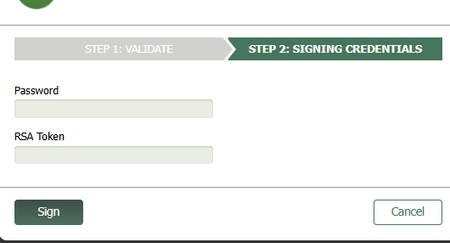
Password and RSA Token fields
Hello, This is a screenshot of the fields I must fill in. If it does not show up it is a "Password" field above an "RSA Token" field. I must obtain the RSA Token passcode from the RSA app and enter it manually. This is the problem: When I use the 1P extension to autofill the password, it autofills the RSA field instead of the Password field. Highly annoying so I would be grateful for any suggestions. This is an iFrame which is why I am using the 1P extension to begin with. When I use MS Edge PW manager it autofills the correct password field so I guess I could use Edge PW manager just for inline webpages and 1P for everything else but I would prefer to use one or the other. (I disabled Edge PW manager when I started using 1P - does anyone have experience using both?) The password for the above field is the same as the password for the main webpage. Ideally it would just autofill but I understand there is a security reason preventing this. I understand MS Edge PW manager does not have the same security issues because it created the browser and can handle tricky field detection better than 3rd party apps. Thank you.12Views0likes2Comments
v8 not loving it - we might break up
I don't often send reviews - takes to much time to do it well - here goes my short rant forgive me. I made friends with it after LastPass major data leak user emails (2021-22) due to an employee password getting leaked! (if you had super secure password you were not as compromised but scammers had your data) v7 was a clean fresh large view interface. No distracting attention competing bright icons. Once I learned it I don't want to relearn it with an update for security esp. my password manager. Thank you Also all the Actions were conveninetly located above the item. And the default app text is smaller. v8 now replaced by a visually busy multi colored interface with small text and hidden some buttons - v7 had everything I needed regualrly at glance without googling where to dig for the action I needed. I hate dark mode. My brain likes white space and my eyesight requires the contrast. I know lots of people love it so ok if they turn it on, but don't assume everyone prefers it. Pehaps there is a 'View settings' I can change - annoying I have to dig The browser extension on all my devices also stopped working after I had to update my office password and I finally just deleted the extension and will try to reinstall it on Chrome. There are a million apps for absolutely everything now and I can't stand the cognitive demand just to mange them - I have a job and hobbies I prefer to use that limited resouce on :-) Generally I like to support open source software so I also tried Bit Warden but it was too complicated for my limited attention span. Download all the csv files and data being in the wrong order was very very frustrating. This is not an upgrade for me and we might break up.....85Views1like3Comments
How can I remove a tag from many items at once?
Mac 1Password - v 8.12 - I have many items that have two different tags. Q: How can I find all of these records with both tags and then remove one of the tags on all these records at once? I can search like this: =tag:tagA =tag:tagB And many results show up I tried to select all items at once and then if I write click on this it only allows me to archive them or move them or delete them but no editing choice After selecting all of them - the right side details menu is blank So there's no way to select a tag and remove it to all of them at once that I know of I imagine there's a better way than what I am doing –can you share any ideas on this subject?18Views0likes1Comment
How to Migrate 1Password Vaults to Bitwarden Folders (With Passkeys!) using iOS 26 CXP
I just finished migrating my credentials from 1Password to a fresh Bitwarden setup, and I wanted to share a workaround for a major pain point regarding vault organization and Passkeys. Those who used 1Password v7 will remember that exporting by vault was standard. In v8, this has been reduced to an "all-at-once" account export. If you want to maintain your organization during a move, this creates a mess. The Challenge: Maintaining Structure If you have multiple vaults (Work, Personal, Shared, etc.) and want them to land in specific Bitwarden Folders, an "all-at-once" export creates a massive, unorganized pile. Plus, standard file exports (CSV/1PUX) usually break Passkeys. The Solution: The "Single-Vault Pipeline" (iOS 26 CXP) By using the newly introduced Credential Exchange Protocol (CXP) on iOS 26, you can move your data app-to-app, vault-by-vault, and keep your Passkeys intact. (Note: I used a 1Password Family account and a free Bitwarden account for this). The Migration Manual: Prep 1Password (Web Browser) Log into 1Password.com on a desktop. Go to Manage Account > People > Select your account > Manage Vaults. The Trick: Deselect all vaults until only one is left visible to your user. Now, your mobile app will only "see" that specific vault. The CXP Transfer (iOS Device) Open the 1Password app on your iPhone/iPad. Navigate to Settings > Advanced > Start Export. Enter your account name (there is a hint at the bottom) and approve. Select Bitwarden as the destination. It will open Bitwarden and securely transfer everything from that one visible vault—including Passkeys and TOTP seeds. Assign to Folders (Bitwarden Desktop) Open the Bitwarden Web Vault on your computer. Click on "No Folder" (this shows all the items you just imported that don't have a folder assignment). Click the "Select All" checkbox at the top. Click the three dots (⋮) above the list > Add to Folder. (Note: You’ll need to create the folder first by pressing the + New button). Rinse and Repeat Go back to the 1Password web interface. Deselect the vault you just finished and select the next one. Repeat the iOS export. Because Bitwarden treats these as new "unassigned" items, you can neatly move the next batch into the correct folder. Why this is the optimal way: Passkeys & 2FA: Unlike file exports, CXP moves the actual cryptographic keys for Passkeys and your TOTP seeds. Shared Protocol: Because it uses a modern exchange protocol, misc info and custom fields transfer much more accurately than a messy CSV. Organization: You don't have to manually sort 1,000 items at once. You do it in controlled, vault-to-folder chunks. Hope this helps someone else stuck in the migration process!350Views2likes5CommentsDeselect "trust this computer" and "keep me signed in"
I have 2FA with 1P as an authenticator implemented on many websites. Some (most?) websites offer the option to "trust this computer." Often it is checked by default. Sometimes I accidentally check it. It seems that then the next time I log in the 2FA is ignored. I would rather have 2FA required, and not ignored, since 1P makes it easy to log in with the one-time password. That way if someone has access to my device they would have to get access to 1P in order to log in. It also gives me comfort to see 1P filling in the digits for the one-time password. Some websites make it relatively easy, though with a lot of clicks, to untrust computers to remedy this bypass. Some websites make it very obscure and difficult to try to untrust computers. I would PREFER that 1P give me the option in settings to have the default be either check or uncheck "trust this computer," and it would make the appropriate change on the website form. If I then want to check "trust this computer" for a particular website, 1P could explain that this means that 2FA is ignored and confirm that I really do want to check it. Similarly, I usually prefer to sign or log out of a website rather than stay signed in so someone with access to my device has to sign in and can't simply go to the website without signing in. Since 1P makes signing in easy, I don't mind having to sign in when I go to a website. I would PREFER that 1P give me the option in settings to have the default be either check or uncheck "keep me signed in," and it would make the appropriate change on the website form. If I then want to check "keep me signed in" for a particular website, 1P could explain that this means that username and password are ignored and confirm that I really do want to check it. Maybe there's a better way to implement this. The point is I don't want to keep signed in and without 2FA as a result of default or inadvertence. These seem to be means to bypass security otherwise provided by 1P. While convenient, they are too lax for me. Thanks.28Views0likes0CommentsI cannot acces my data anymore
after an update I cannot access my data anymore. 1password opens with facecheck and leads me to a page wirh the options to add my account or use a 14 day test version. I know my Password, but not the secret key asked for. Is there any option to reset the software and unlock it by facecehck again?103Views0likes7Comments
Emergency access in lastpass
used to use lastpass. one feature that i miss is "emergency access" allows someone to leave password access for another user in an emergency, but sends a time restriction, like give that person access in 3 weeks... any way to get that affect in 1password.20Views1like0CommentsRename a SSO "supported provider"
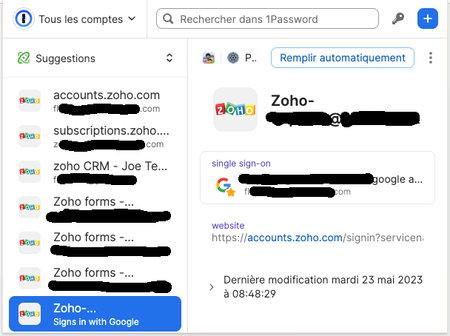
I have multiple Google accounts/emails (pers+work+aliases) and if I let 1password register a connection it will only show as "Signs in with Google" So I cannot know when trying to connect, which Google account it may try to use or was registered. On some services I may have multiple accounts, and use username/password for one account, SSO for another. Am I missing something to make the "Google" more descriptive?10Views0likes0CommentsLocking 1Password
Is there a way to have 1Password autolock after *it* (as opposed to browser, keyboard, mouse, activity, etc.) has not been used for a certain time? I'd be interested in all scenarios, but am particularly interested regarding browser extensions at the moment. Thanks!34Views0likes1Comment