Protect what matters – even after you're gone. Make a plan for your digital legacy today.
browser extension
6583 Topics
Has something changed: http:// not filling in any more?
For passwords I have that are specifically http:// like on my own Lan, these aren't being suggested any more by 1Password extension in Brave. Anything https:// is working. And yes I have http:// set as the Website address. I'm sure this was working until very recently.88Views2likes8Comments
in Chrome how do I disable autofill of Google Wallet items?
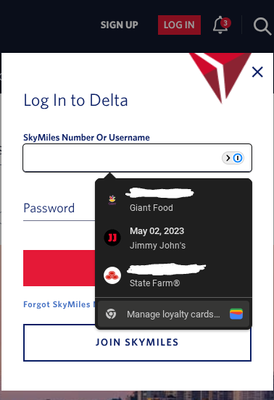
I have some passes, loyalty cards, etc. saved in my Google Wallet. Rather annoyingly, some recent change has caused a Wallet autofill menu to start popping up where it is not wanted, specifically, on the Delta login dialog: I cannot figure out how to disable this. If I go to chrome://settings/payments it shows that 1Password is managing auto-fill: I have also looked all over https://wallet.google.com/ and https://payments.google.com/ and related pages and cannot find any setting that would control this; I have tried disabling 1Password in the above dialog just to make sure I can toggle "Save and fill" off but that doesn't help. In fact, the pop-up menu in the first screenshot only appears when 1Password is enabled. If I disable 1P and reload the Delta website then that popup does not appear. This would seem to imply it is either under 1P's direct control, or a result of how 1P interacts in combination with Google Wallet. This is not a critical bug, since the 1P fill button is still clickable, and/or I can fill my DL creds from the 1P toolbar icon, but it is definitely an annoyance to have the loyalty cards popup in my face when I don't actually _ever_ want it to show up (if I want to autofill a loyalty number that badly I will simply create a 1P entry for it, I don't want to pull anything over from Google Wallet; and even though I can see how others might want that feature, (a) it should be toggle-able (b) wouldn't it be better to integrate the autofill into the existing UI elements instead of popping up a completely separate menu?)77Views0likes3Comments
Bug? Browser extension not unlocking or filling in password
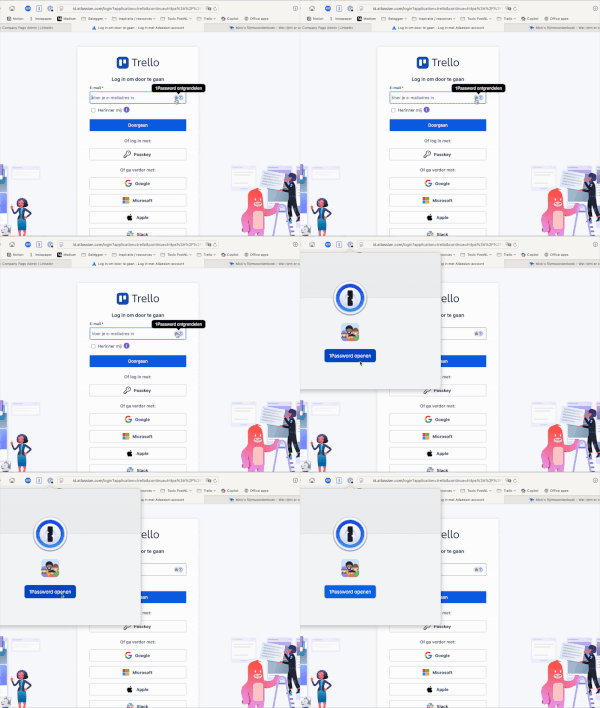
My 1Password browser extension often refuses to unlock and fill in passwords. Even when I click 'Open 1Password' on the menu bar icon it won't open the app. I already tried reinstalling my browser extension, but no success. Sometimes the extension will work, but the issue is unpredictable and doesn't seem to be tied to specific sites. Software versions used: MacOS 15.6.1 Safari 18.6 (20621.3.11.11.3) 1Password for Safari 8.11.20.39 1Password for Mac 8.11.20 (81120039) Screenrecording of the issue:62Views0likes3Comments
American Express--autofill fails when username is saved
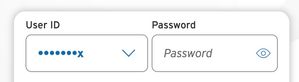
MacOS, using MS Edge. Some sites offer to save your login user name; two examples of this are citi.com and americanexpress.com. In each case, they show those as mostly hidden--for example, johnsmith would show up in the user name field as ********h. We then need to simply add the password, and log in. citi.com does this; when I click in the password field and open the 1P browser extension, it lets me choose my citi.com entry and it happily fills that and away I go. American Express, though, thoroughly confuses the browser extension. Nothing can happen until and unless I delete the saved user name of ********h and let the browser extension fill in both user and password. Not the end of the world, just a heads up. Here's the citi.com login for reference. A simple click in the password field, the browser extension lights up, and all is well. Not so for amex.3Views0likes0Comments
1password constantly prompting for passkey on some sites
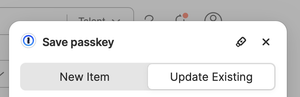
When visiting some sites that supports passkey (UpWork.com is one), I often get bugged about passkeys on every single page visit I make. The passkey notice is quite annoying and has to be dismissed constantly. I'm using Safari 26.1 on MacOS, with the 1password extension. Is it supposed to be like this? I know I can disable the prompts for passkey altogether, but I do use it on some sites and it's helpful at times. It's just that some websites cause it to prompt constantly which is very annoying.9Views0likes0Comments1Password 8.11.22 not available for Chrome and Firefox
1P_Dave This appears to be an issue again in both Chrome and Firefox. 1Password for Safari is already at 8.11.22 with the main app. But 1P for Chrome and 1P for Firefox have lagged behind at 8.11.18 and 8.11.16 for weeks. What's up with this? Have those releases been pushed to their respective stores? Firefox is always far behind the others -- but Chrome is usually pretty fast.51Views0likes3Comments
Passkey on Safari results in error "PublicKeyCredential" after upgrade to Mac OS 15.4
Hi all, after upgrading to Sequoia 15.4, authentication using Passkey (which is required by my employer) ends with error message "TypeError: Can only call PublicKeyCredential.toJSON on instances of PublicKeyCredential" on Safari. It was working before the upgrade without any problem. I didn't change anything except system upgrade. On Firefox it's stil working correctly as before (and Chrome didn't work neither before). Is anybody facing the same problem? Is it problem of Safari 1Password extension?1.2KViews0likes68Comments
Issues with unlocking, filling and saving passwords
I started using 1Password about 15 years ago when it was exclusively an OS X app. I remember 1Password being very reliable (I had very few, if any, issues with it), which is why I kept using it over the years and ultimately implemented 1Password for Business it when I became an IT administrator. However, ever since 1Password transitioned into a subscription-based model (I think this also coincided with them moving away from native apps and to cross-platform Electron development), 1Password has been an unreliable mess. I kept expecting AgileBits to iron out the issues, that things would eventually get better, but they just haven't. It's been about 3 years now and I still constantly have problems with basic functionality. I have 1Password installed on 35 Windows 11 machines at work which I manage (many of which are less than a year old), I have it installed on iOS and Android devices (both personally and work), and I have it installed on my personal MacOS devices. Recently, I got a brand new M3 MacBook Pro, which I thought for sure would be the ideal scenario for 1Password since I kept it on a clean install (no Time Machine Migration) and it's even been unreliable on there. It was honestly flabbergasting and felt like the last straw for me. Here is a list of the kinds of things I'm talking about which happen constantly: 1Password simply doesn't appear on the password fields to autofill until I refresh the page again or sometimes have to restart the browser. 1Password is unlocked but it still appears to be locked when it appears next to fields in the current webpage until I restart the browser. 1Password unlocks in one place but not the other. I use the password generation button to update a password for an existing login only to have 1Password fail to offer to update the login info as I intended. I generate a password for a new login and 1Password fails to offer to save the new login information, forcing me to fish out the generated password in the most unintuitive way imaginable because it's buried under 3 different menus and turning that into a new login manually. These kinds of things (among others) happen constantly both to me and my users and I'm honestly starting to get to my wits end here. Can anybody help me understand why these things are happening, why 1Password hasn't fixed this, and whether this will eventually get back to the kind of reliability that I grew to expect with the native Mac OS app I started using so many years ago? Is Electron just so inherently bad that 1Password will simply never get to the point that it used to be? Do I just need to switch to another password manager?122Views1like5CommentsNative Password AutoFill Extension macOS
So one of the people in my family subscription for 1P relies heavily on iCloud Keychain. The nice piece about using the native autofill extension is entries from both show up together in-line. This happens on iOS (or if you use other password managers it secure by each provider but both are offered the same way together). in terms of migration and allowing those who wish to use both depending on the context. It would be nice to support the native autofill extension, but further it limits exposure or need for safari extension. Should someone not want to use or can't install the extension due to work policy or just rather not use safari extensions thanks. 1Password Version: 8.x Extension Version: Not Provided OS Version: macOS 12.6 Browser:_ Safari5.4KViews16likes160Comments
Passkey experience - keyboard
Until passkeys came along, I could always conveniently and quickly sign into websites without taking my hands off the keyboard. Now that passkeys exist, I have to annoyingly use the mouse to click 'Sign in'. I just thought that it will get better soon, because it's all new, and the developers haven't got around to fixing it yet. But perhaps it hasn't occurred to them? I suggest that the extension should allow users to assign keyboard shortcuts to sign in with a passkey.12Views1like0Comments