Protect what matters – even after you're gone. Make a plan for your digital legacy today.
experience
53 Topics
1Password extension unusable in Safari on Mac
Running Tahoe 26.3.1 on my MacBook Air with 1Password for Mac 8.12.8 installed and filling in logins on websites in Safari is absolutely atrocious. It seems to work about 10% of the time. When I attempt to fill login forms, I will click the extension icon in Safari and it will either not load, load a broken box, or take 25 seconds to load. WHAT IS GOING ON?! I have perused the community and tried all the "solutions." I have uninstalled the extension and reinstalled it dozens of times. I switched to 1Password because it was bulletproof. But now it is the least reliable item in my stack. The downfall of this app should be studied. Just absolutely sad.98Views1like9Comments
iOS 26.2 AutoSave Incorporation Possibility?
Recently, other password managers like NordPass have https://nordpass.com/blog/nordpass-ios-update-notes/#nordpass-4101-latest, which acts the same way the 1Password Browser Extension does, where it automatically saves login info upon logging into an app or website. In theory, 1Password should be able to mimic this capability, correct? It's only available on iOS 26.2 and above, but this capability SHOULD make the hassle of saving passwords & logins on iOS & iPadOS practically non-existent. I've seen that in the https://releases.1password.com/ios/beta/#1password-for-ios-8.12.6-31, there was a patch note that read... It’s now easier to generate and save passwords when you use Autofill. ...but that doesn't specify whether autosave is incorporated yet or not, and the Testflight beta is at full capacity, so I wanted to see if I could possibly get some clarification.47Views0likes2CommentsWatch Tower and ignores for 2FAs plus ignored Passkeys??
I need another item clarified. When I check my score in Watch Tower, I see about 14 items that were not set up for 2FA. It is now down to 8, but all I did was ignore. The reason being that I have Passkeys for some of these. Then choosing to ignore is ok and should raise the Watch Tower score, correct? The other part is more concerning. I have a Passkey for a Google account, yet Watch Tower is listing that Google account as a Passkey possible. Should I just ignore and take this as SOP? Seems odd that I try to login to my GMAIL and it lists possible Passkeys, yet Watch Tower says that account has a Passkey available - like I never created one. This is just one example and I have screenshots of both the Passkeys in 1PW and showing the Passkeys available for me for Google accounts.14Views0likes0CommentsSaving login credentials in iOS apps
How does 1pw pick up the pw creation when signing up in an app? I know it does well with website logins but many apps I have to generate a pw and save as a new login. 1pw won’t pick it up and run with it like browser/site creations. Is it something I’m not doing right? My assumption is that apps are much harder for 1pw to see on my iOS phone. Versus sites that the Edge extension sees about all the time.Solved67Views0likes2Comments
sales contact
I would like to purchase a business account for my small business (just two people - I currently have a family account). The options online are "try 14 days free" or "contact sales". When I go to contact sales, it has me fill out a form. I have filled out the form twice in the last month and have not heard anything back. There is no phone or email to contact 1password. How do I actually purchase the business account?47Views0likes1Comment
Community password 62 character maximum limit
Seems kinda funny to me that the password manager I use ubiquitously to create 100 character password only allows me to create a 62 character password for the community forum (and doesn't signal that in it's password creation hint popover). Clearly this is an active choice by someone, so I'd be interested in hearing from 1Password themselves why that choice felt like a good idea. I spend a lot of time battling sites that: don't publish their password restrictions at all; allow you to create a password, but the login box then doesn't permit that number of characters; do publish password restrictions, but the restrictions don't match reality only allow super short passwords It would be nice not to add 1Password themselves to that list of 'troublesome' websites :-) On the upside, this WYSIWYG editor is delightful.Solved436Views6likes5Comments
Feature thanks
Hello, It's with gratefulness that I pass along thanks to the 1Password developers and staff for creating a feature that allows the password to be enlarged. This feature is valuable for those of us with a need to see larger print and is especially helpful when complex passwords include spaces between the characters. The feature has number for each character, making it very easy to see blank spaces. Thank you so much!37Views2likes1Comment
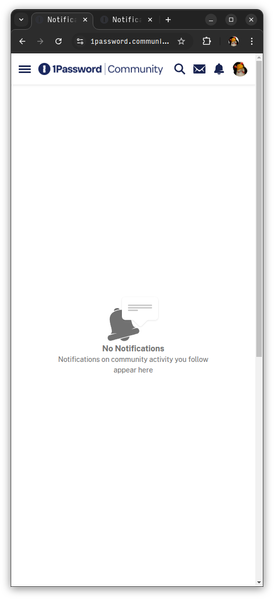
No Notifications 🔔 (sometimes)
When clicking the bell icon (🔔) with or without the blue dot (🔵), the Notifications page will often open to show "No Notifications" where there are Notifications. Reloading the page, or opening it in a new tab or window, will usually show the Notifications. Sometimes reloading the page showing Notifications will show the "No Notifications" page.147Views0likes5Comments