Protect what matters – even after you're gone. Make a plan for your digital legacy today.
family
116 Topics
SourceNext license not activated / Support not responding
Hello, I purchased a 1Password Families license via SourceNext, but my account is still not activated. I have contacted support multiple times, but I only receive automated replies and no response from a human agent. My ticket IDs are: 550114, 552400, 553xxx, 553xxx, 554xxx, 554xxx It seems that my requests are not reaching a human. Could someone please help escalate this issue? This is urgent because I cannot use the service. Thank you.29Views0likes1Comment
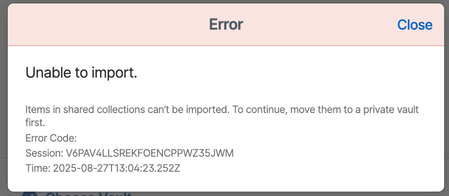
How to import Bitwarden organization vault?
I'm migrating my vaults from Bitwarden, where I have a family plan. My personal vault imported fine, but when I try to import my organization vault (containing shared credentials for my family) I get this error. I browsed the help pages for 1pass but I didn't find a solution. I'm not sure what "Move them to a private vault first" means. How do I import my shared family vault?197Views0likes4Comments
Time sensitive help with ticket
Hi 1PW Support, My support ticket ID is 535171. I put it in 3 days ago and getting nervous because the system is about to charge me double the amount based on the generated invoice. Can I get someone to grab the ticket and work with me via email please?30Views0likes1Comment
Separate family tags from mine
After sharing several items back and forth with my family, I keep seeing their tags on my tags list and they make no sense to me; my list is now "polluted" with irrelevant tags. Feature request: I would like to be able to hide tags from shared items.15Views0likes1Comment
Cancellation prior to renewal
I tried to cancel 1Password prior to the renewal date and was unsuccessful. I have reached out to 1Password via chatbot who send me an email correspondence that a support team would get back to me. I have had not support team get back to me (did check junk mail). Chat bot continues to send me emails. Is there another way to get ahold of a customer support individual? My wife and I have been long time users of 1Password. You would think someone would at least respond back .....35Views0likes1Comment
How to Migrate 1Password Vaults to Bitwarden Folders (With Passkeys!) using iOS 26 CXP
I just finished migrating my credentials from 1Password to a fresh Bitwarden setup, and I wanted to share a workaround for a major pain point regarding vault organization and Passkeys. Those who used 1Password v7 will remember that exporting by vault was standard. In v8, this has been reduced to an "all-at-once" account export. If you want to maintain your organization during a move, this creates a mess. The Challenge: Maintaining Structure If you have multiple vaults (Work, Personal, Shared, etc.) and want them to land in specific Bitwarden Folders, an "all-at-once" export creates a massive, unorganized pile. Plus, standard file exports (CSV/1PUX) usually break Passkeys. The Solution: The "Single-Vault Pipeline" (iOS 26 CXP) By using the newly introduced Credential Exchange Protocol (CXP) on iOS 26, you can move your data app-to-app, vault-by-vault, and keep your Passkeys intact. (Note: I used a 1Password Family account and a free Bitwarden account for this). The Migration Manual: Prep 1Password (Web Browser) Log into 1Password.com on a desktop. Go to Manage Account > People > Select your account > Manage Vaults. The Trick: Deselect all vaults until only one is left visible to your user. Now, your mobile app will only "see" that specific vault. The CXP Transfer (iOS Device) Open the 1Password app on your iPhone/iPad. Navigate to Settings > Advanced > Start Export. Enter your account name (there is a hint at the bottom) and approve. Select Bitwarden as the destination. It will open Bitwarden and securely transfer everything from that one visible vault—including Passkeys and TOTP seeds. Assign to Folders (Bitwarden Desktop) Open the Bitwarden Web Vault on your computer. Click on "No Folder" (this shows all the items you just imported that don't have a folder assignment). Click the "Select All" checkbox at the top. Click the three dots (⋮) above the list > Add to Folder. (Note: You’ll need to create the folder first by pressing the + New button). Rinse and Repeat Go back to the 1Password web interface. Deselect the vault you just finished and select the next one. Repeat the iOS export. Because Bitwarden treats these as new "unassigned" items, you can neatly move the next batch into the correct folder. Why this is the optimal way: Passkeys & 2FA: Unlike file exports, CXP moves the actual cryptographic keys for Passkeys and your TOTP seeds. Shared Protocol: Because it uses a modern exchange protocol, misc info and custom fields transfer much more accurately than a messy CSV. Organization: You don't have to manually sort 1,000 items at once. You do it in controlled, vault-to-folder chunks. Hope this helps someone else stuck in the migration process!350Views2likes5CommentsSMS indicator on Shared items
Some logins require a verification code sent by text message (SMS) in addition to the password. Our family puts them in the Shared vault anyway, even though only the phone owner can actually use them. It's helpful for everyone to see which accounts exist, and it's sometimes convenient to login on someone else's laptop. It would be nice if there were a clear indicator on the 1password entry itself that the login will require SMS verification, and cannot be used by just anybody. Sure, we could manage it ourselves by adding "SMS" to the title text or putting such entries into a separate vault, but I'd like to see native support in 1password, like a checkbox we can use to flag login entries that require two-factor authentication (2FA).22Views0likes1Comment
Incorrect list of cards on bank portal
Hello, My bank (CIBC) has updated their portal. SInce then, the list of numbers (card numbers) proposed by 1Password is the list of credit cards I own, not the list of bank cards. I have updated URLs in my bank card entries to reflect the new navigation at the bank: no change. If I enter my bank card manually, 1password offers to store a new credit card entry... What am I missing ? Martin48Views0likes4Comments
1Password not generating OTP
Hello, I scanned QR code for one time code in one of the enteries in 1Passowrd. One password gave me a 6 digit code on scanning that I registered with the website. Now when I try to login to website and go to 1Password for one time code, it is showing an error message in one time code field. If there was an error in URL, why did it register that one time code in the first place. I am now locked out of target site. It gave me a code to register with the site and saved my entry. Now it is giving me error next time. Any way to get the one time code generator to run as it should have saved all the necessary info. Error message: one-time password The one-time pasword URL is incorrect. check the URL and try again. if you still have trouble, contact supportSolved63Views0likes3CommentsDidn't get discount as a new user
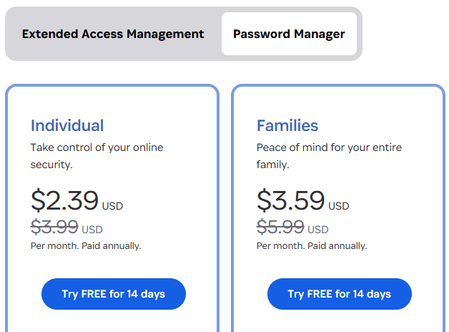
Hi there I just created an account and still under the 14 days free period. I would like to subscribe for the Families Plan and everything showing that I'll save 40% but when I am up to the payment page it requires me to agree to pay the $79.07 USD. How can I confirm the 40% off discount will apply as it requires me to agree on the full price without discount??? Thanks Mike337Views1like2Comments