Protect what matters – even after you're gone. Make a plan for your digital legacy today.
linux
595 TopicsLinux: System authentication no longer being used
I use 1Password on Linux Mint (version 21.3 for a long time now), and for years have been unlocking the Chrome browser extension (I always have the latest Chrome release) with my ThinkPad T530's fingerprint scanner. In my Settings > Security, checkbox "Unlock using system authentication service" is checked (with Confirm my account password every 14 days). However, for months now (iirc after updating to a new version of 1Password – I always install updates immediately), after "You must enter your password before you can use system authentication" I continue to be asked for my password every time. I've tried uninstalling and reinstalling 1Password, but it makes no difference. Is there anything I can do to make 1Password use system authentication again?29Views0likes1Comment
Support for Imput's Helium Browser
Hiya! I'm an avid 1Password user and I utilize every possible corner of it. BUT there's a certain issue that I'm facing when I'm using it with unsupported browsers. Mainly, Helium Browser (https://github.com/imputnet/helium) which includes unbiased privacy at no compromise to webpage functionality isn't supported. This is an issue because there's no other browser I'd use. The problems that arise are apparent on all platforms, like: Manual addition in the 1Password app on macOS (which, lately, seems to spaz out when using it with the extension) Inability to use with the system app on Windows which inconveniences users by making them log into their vault twice (which, if I guarantee, many have a complex password for and can't bore themselves typing it out multiple times per session) Broken behaviour on Linux, where even with the custom browser config it still can't unlock the vault if it's unlocked on the system. No, I wasn't running the Flatpak version. IMHO 1Password is better than the competition in terms of UX, but seeing my daily driver struggle with that with no way to fix without resorting to this is awful.699Views3likes4Comments
Feature Request: 1Password on Flathub
Since the recent https://1password.community/discussion/comment/615214/#Comment_615214 would be, time to publish 1Password on https://flathub.org/home. Flathub is the best known Flatpak package store, so it would be a good idea to public 1Password on it, and it is easier to find Flatpak apps directly from it, since users expect most Flatpak apps to be there. Here is the guide on how to publish on Flathub: https://github.com/flathub/flathub/wiki/App-Submission 1Password Version: Not Provided Extension Version: Not Provided OS Version: Not ProvidedSolved6.6KViews0likes31Comments
1Password on Linux fails to export passwords to 1PUX
Hi, 1Password for Linux 8.12.5 (81205001) fails to export to 1PUX on Ubuntu 24.04. After typing the master password, pressing 'Export Data' nothing happens (I was expecting the window to select where to save the file). In fact I tried it on two Ubuntu 24.04 machines, and the same happens on both. SergeySolved78Views0likes4Comments
Integration between Linux app and Snap Firefox
Some days ago it was released the support for Native Messaging (still experimental) with Snap Firefox. I checked, but the integration between Linux app and Snap Firefox still doesn't work. I was wondering if the integration uses Native Messaging or other way to implement, and if it is using other way, if it could be ported to use Native Messaging, so Linux app could work with Snap Firefox. We are discussing this matter here 1Password Version: 8.9.0~1.BETA Extension Version: 2.3.7 OS Version: Ubuntu Kinetic Browser:_ Firefox3.5KViews6likes41CommentsExport silently fails
Trying to do a *.1pux export from the desktop app on linux (1Password for Linux 8.12.5 81205001), it silently fails. The password is definitely correct (if not, I get a 'That didn't work ..' message). But when I hit the 'Export Data' button, it spins for a moment then .. nothing. I assume the next step should be a dialogue to choose the file name & location, but the button just re-enables after a brief spin. Same if I choose csv export. I've done a comprehensive search for 1pux files on my drive, just in case one was dumped somewhere unexpected, but no.Solved53Views0likes2Comments
Login banner pop-up
Many times this annoying login banner appears on top of the screen even when I am already logged in on that particular site. Is there a way to disable this thing? I don't even understand what it is for, the login pop-up when clicking on a login field should be quite sufficient. I am on Ubuntu 24.04.4 with 1Password 8.12.5Solved62Views0likes3Comments
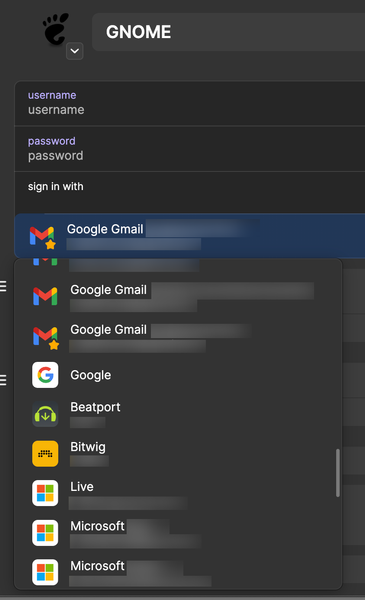
Improve “Sign in with” Dropdown UX (Sort & Filter)
Introduction Long-time Family and professional user here, and I must say I’ve been missing a better UX for the “Sign in with” feature for quite some time already... More specifically: As a user, when interacting with the "sign in with" dropdown and when I have too many "sign in with" options, it becomes difficult to find exactly which one I want to use. Sign in with dropdown 1Password for Mac 8.12.2 (81202037) Suggested changes 1. Sorting The dropdown currently doesn’t appear to follow a clear or predictable order. Looking at the image above, entries like “Beatport” and “Bitwig” appear between “Google” and "Microsoft", and it’s not obvious why. So, how about Use a clear default sort order (e.g., alphabetical by Name) Bonus: allow an optional (ascending or descending) sorting criteria by other fields, such as Username Website Tag Date (last edited) ... 2. Searching / Filtering Frequently when I open this dropdown, I already know which login I want to use. So it would be much faster if the dropdown supported typing to filter results... Even a basic, incremental search would be good enough already (because, currently, we have nothing.) Conclusion These changes are small UX improvements, but that would make daily use smoother for power users. With many entries, predictable ordering, searching and filtering make a big difference... And, of course, from an implementation and design perspective, you could also put all that into a reusable UI component. Who knows, searchable dropdowns might be useful elsewhere in the app…!50Views1like1Comment
Linux Arm packaging
In a previous thread from probably 2 years ago, it was mentioned that you all had some trouble with getting a toolchain to setup to create packages for 1Password on Linux running on Arm processors (in my case, I care about Armv8). Any updates on the status of getting this toolchain setup, so that users can pull packages from proper repositories for their specific variant of Linux (.deb, .rpm, etc)? Yes, I know we can pull bits out of git, but it would be nice to have updates properly automated. Not to have to notice there's a new build every time you instantiate 1Password. Adding, not trying to be a whiny jerk about it. Is there anything I can do to help? _1Password Version:8 _Extension Version:2.15.1 _OS Version:Ubuntu 23.04 _Browser:Chrome/Firefox133Views0likes8CommentsPlease add an option for hiding the contents of categories
I would like a way to toggle certain categories as hidden, which would mean they would follow settings similar to passwords — toggle visibility, visible or invisible by default, etc. It would come in handy for recovery codes, since without this they are always visible, which is a security hazard. I would also like an option to do this with the contents of secure notes. My request is very similar to this feature request: Feature request: Option to hide value of any field | 1Password Community, which still hasn't been implemented, so I'm asking for it again, since I would really like this feature.138Views0likes4Comments