Protect what matters – even after you're gone. Make a plan for your digital legacy today.
macos
5146 Topics
MacOS 26.1 w/ 8 1P Sync Error
I moved from 1 Password 7 --> v 8.11.22... I know I'm a bit slow with my passwords. Now that passkeys are more of a thing it was worth the change. I'm seeing an orange cloud w/ a diagonal line across it to the right of the search box like there is an issue syncing stuff. I have added items from both the Mac and the phone three of my devices have been upgraded to the new software using the cloud items. Still move things from the import to better categories. I did have a passkey that looked like it was created, but did not show up. I'm thinking that is the problem, but don't see anything in the offline location it says to check. I'm not sure what is missing or how to correct the problem. Looking for help as most of the old entries are 1.5 years or older.Solved18Views0likes2Comments
Safari-extension not working on self hosted app
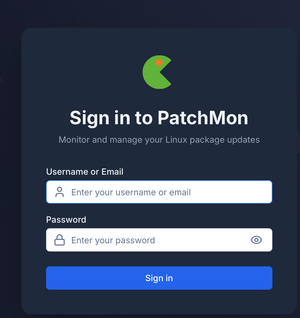
Hi! I'm running a little home server with an instance of https://patchmon.net (among other self hosted apps). For some reason, the Safari extension does not propose an auto-fill of my login credentials (which are correctly stored in 1P. My system is up to date (macOS 26.2, latest 1P and latest extension. Any idea how to fix that? Thanks!44Views1like2CommentsSyncing issues on Macbook
Hi all. I have had a Macbook Air for years and for as long as I had it I have had issues with 1Password and not seeing the latest changes made on other devices. Locking and unlocking the vault always pulled the latest changes or updating/restarting the program. It was annoying but I had a workaround, at one point when I was using the Macbook more often I submitted a ticket to support who looked into and suggested it was maybe a network profile or something similar affecting it. I put the problem in the too hard basket and moved on. Recently I got a new Macbook Pro and elected not to move from my existing Macbook Air with the wizard or a time machine backup. I wanted to start fresh and I also wanted to lose whatever was causing me that annoyance for years with 1P and Macos on my Macbook Air The new Macbook Pro has the same "bug". I daily drive a Mac Mini which doesn't have the issue ever. Logically my theory is it must be power related, something 1P or MacOS do with syncing when its detected that its on battery power maybe? I don't have this issue on Windows, MacOS (Mac Mini) or and iOS based devices, only the Macbook. Is it possible something in 1P or MacOS is pausing or preventing updates in an effort to save battery life?20Views0likes4Comments
Multiple email addresses but only shows one option on AutoFill
I put multiple email addresses under my default identity, but it only gives me one option when I go to autofill my email address on a new website for example (MacOS, Chrome). I tried putting the additional email addresses as Email items but they don't even show up on the web or anywhere else either.8Views0likes1Comment
How to Reveal Entire Credit Card Number
On my Mac and IOS devices, when I click reveal number on credit cards, only first and last 4 numbers are revealed. I have put in settings always reveal on my Mac and it still doesn't reveal them. What am I missing. So many times websites doesnt accept auto filled numbers on transactions and I need the number so I won't have to go get my wallet. Really frustrating!Solved19Views0likes3Comments
1password constantly prompting for passkey on some sites
When visiting some sites that supports passkey (UpWork.com is one), I often get bugged about passkeys on every single page visit I make. The passkey notice is quite annoying and has to be dismissed constantly. I'm using Safari 26.1 on MacOS, with the 1password extension. Is it supposed to be like this? I know I can disable the prompts for passkey altogether, but I do use it on some sites and it's helpful at times. It's just that some websites cause it to prompt constantly which is very annoying.27Views1like2Comments
Passkey autofill behavior on Crewbloom login (Safari + 1Password)
Hi everyone, I'm seeing some odd behavior with 1Password on Crew Bloom. Basically, this is our staffing & remote hiring platform, by the way! I wanted to check if anyone else has run into this. On Safari (macOS) with the 1Password extension, Passkey or autofill prompts seem to trigger repeatedly when navigating between pages, not just on the login screen. In some cases, autofill doesn't appear at all unless I refresh the page. Is this something related to how CrewBloom implements authentication, or could it be an extension/Safari interaction issue? Curious if others have seen similar behavior on recruiting or HR platforms. Thanks in advance!10Views0likes0CommentsOctober at 1Password: Defining new standards, empowering communities, and securing the future
Welcome to your monthly roundup of what’s new in the world of 1Password! 1Password helps author a new open standard for secure credential transfer We’re proud to have helped author a new standard called Credential Exchange Format (CXF), a major step forward in secure, privacy-preserving credential transfer between password managers. CXF will enable people to move their data between password managers safely and consistently, without exposing sensitive details in the process. It’s an open standard developed with other industry leaders to promote portability without compromise. Read the announcement 1Password for Good donates $100k during Cybersecurity Awareness Month During October Cybersecurity Awareness Month, we gave back to communities by donating $100,000 USD to six organizations working to ensure that the next generation has access to the technology education, digital literacy, and online safety skills they need. It’s one of the many ways we are helping communities through our 1Password for Good efforts, including launching a cybersecurity guide for parents with the Family Online Safety Institute. Read the announcement Securing the Win: Our new docuseries with Oracle Red Bull Racing We teamed up with Oracle Red Bull Racing to explore how world-class organizations balance performance and protection. Our new Securing the Win docuseries takes you behind the scenes with the team’s leadership and IT experts. Episode 1: Inside Oracle Red Bull Racing with CEO and Team Principal Laurent Mekies Episode 2: Speed and Security with CIO Mark Hazelton Teaming up with the Utah Jazz and Utah Mammoth We’re excited to announce that we've partnered with Smith Entertainment Group (SEG) — the parent company of the Utah Jazz, Utah Mammoth, and the Delta Center as their Official Cybersecurity Partner. Professional sports franchises depend on speed, trust, and instant, secure access to stay competitive, and 1Password’s Extended Access Management suite will help SEG’s teams protect what matters most both on and off the field. Read the announcement Closing the credential risk gap for AI agents with Browserbase Together with Browserbase, we launched Secure Agentic Autofill, an integration that delivers end-to-end encrypted credentials to AI agents in the browser, only when authorized by a human. This partnership helps developers and AI researchers use LLMs securely by keeping raw credentials out of the model context. Learn more about the Browserbase partnership Introducing .env file support in 1Password environments We’ve added support for .env files in 1Password environments, now available in public beta. This update makes it easier for developers to securely load environment variables directly into local development setups, without exposing secrets in plaintext. You can import, edit, and share .env files across teams while keeping everything fully encrypted and managed in 1Password. Introducing new .env file support in 1Password environments | 1Password Random but Memorable episodes in October Episode 15.7 - The state of passkeys in 2025 Episode 15.8 - What you need to know about car hacking “When you think about the convenience of passkeys, it’s easy to forget how much work goes on behind the scenes to make them secure and interoperable.” – Random but Memorable, Episode 15.7 Release note highlights Browser Extension Fixed an issue where websites with many fields and dropdowns could crash in Chromium browsers. Localization improvements across multiple languages using new translations from Crowdin. On Safari, when you type into a field on a website, you now see a “Save in 1Password” button in the suggestions dropdown. Icons now load significantly faster throughout 1Password. Mac, Windows, and Linux Added breadcrumb navigation to the SSH Agent and CLI pages for easier navigation. Improved localization using new translations from Crowdin. Icons now load significantly faster across all apps. Fixed an issue that could prevent unlocking if the app was closed during sign-in. Improved Guided Setup with a more accurate progress bar. Visual and performance fixes, including smoother launches and rounded window corners on Mac. [Windows only]: Added group policy support using ADMX templates. [Linux only]: Fixed visual issues with prompts and app icons on Wayland. iOS and Android Improved localization using new translations from Crowdin. Icons now load significantly faster. Guided Setup now shows a more accurate progress bar. Fixed an issue that could prevent unlocking if the app was closed during sign-in. [iOS only]: Added a new keyboard shortcut to open in-app settings (Ctrl + Command + ,). [Android only]: Fixed an issue where “Lock 1Password and pause biometrics” didn’t properly lock 1Password.362Views1like7Comments
Native Password AutoFill Extension macOS
So one of the people in my family subscription for 1P relies heavily on iCloud Keychain. The nice piece about using the native autofill extension is entries from both show up together in-line. This happens on iOS (or if you use other password managers it secure by each provider but both are offered the same way together). in terms of migration and allowing those who wish to use both depending on the context. It would be nice to support the native autofill extension, but further it limits exposure or need for safari extension. Should someone not want to use or can't install the extension due to work policy or just rather not use safari extensions thanks. 1Password Version: 8.x Extension Version: Not Provided OS Version: macOS 12.6 Browser:_ Safari5.4KViews16likes161CommentsPasskey on Safari results in error "PublicKeyCredential" after upgrade to Mac OS 15.4
Hi all, after upgrading to Sequoia 15.4, authentication using Passkey (which is required by my employer) ends with error message "TypeError: Can only call PublicKeyCredential.toJSON on instances of PublicKeyCredential" on Safari. It was working before the upgrade without any problem. I didn't change anything except system upgrade. On Firefox it's stil working correctly as before (and Chrome didn't work neither before). Is anybody facing the same problem? Is it problem of Safari 1Password extension?1.3KViews0likes70Comments