Protect what matters – even after you're gone. Make a plan for your digital legacy today.
passkeys
260 Topics
HealthEquity Passkeys
I can report that HealthEquity is working as expected with respect to Passkeys. As of today 10-24-2025 Health Equity states that you can only login with Passkeys going forward, no name and password with 2FA, except to get the ball rolling. I set it up on iOS 26, including iPadOS 26. The process starts with the HeathEquity app and proceeds to set up the Passkey - which I am then allowed to save to 1Password. Once setup, I also turned on settings within the HE app, to login via Face ID (and Touch ID on the iPad). I am now able to login to the app with that one, single/same Passkey on iPhone, iPad and via Safari. This is what I was hoping for and that I hope is the paradigm for all passkeys - for apps and websites - going forward. What I don’t know is what kind of recovery process HealthEquity has. 1Password should serve as a backup in case of loss of devices - but others may not have a password manager to help with this, even though Apple has such management built in, and probably Google. I’m just thinking that at some point you might have to rely on some kind of recovery.84Views0likes3Comments
Passkey CR - Allow 1P To Scan QR Code
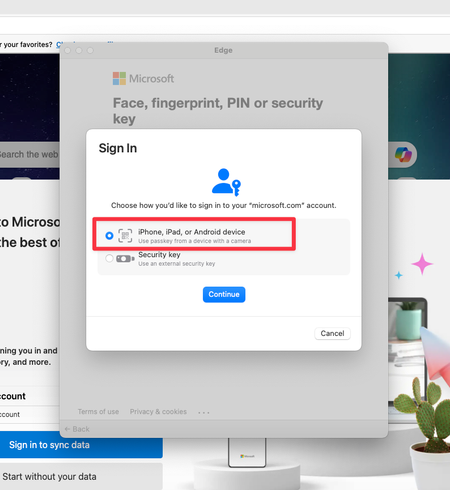
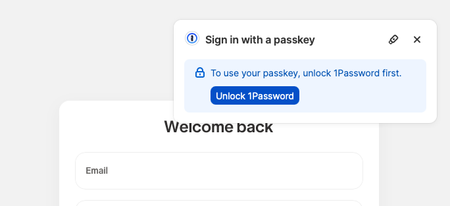
There are many times when I am browsing in some browser (like Safari, Edge, etc.) and the site recognizes that one or more passkeys have been created for the site and it pops up a prompt asking for to use a device (such as a phone, tablet, etc.) where some biometric authentication can be used to access the device's passkey. However, since I am saving my passkeys in 1Password, I am handcuffed at this prompt since there doesn't appear to be any way for me to use the passkey that is stored in 1Password for the site and scan the QR code. It seems like 1Password should be able to scan the QR code that the popup window presents and use the saved passkey for the site. I don't know exactly how this would be invoked. My guess it would be some option to use the passkey from some saved login entry. May you please pass this along to see what the developers think of this idea? If anyone else is interested in having this feature, please feel free to like/comment/watch. Thanks.Solved289Views0likes8Comments
Unlock 1Password with Passkey
I think it’s maybe at least 3+ years since 1Password team enthusiasticly introduced us to this very important and potent feature. They offered excellent educational blogs and detailed articles that 1Password is so well known for. The project appeared to be already in the works. As I recall, the buzz and anticipation lasted about 1.5 years. Apart from Beta testing by some users, there has been no substantial (if any) communication from Agilebits (that I am aware of) about the project. As paid subscribers, I feel entitled that we be informed of the project status. Please?Solved223Views0likes3Comments
Accidentally deleted a passkey
Hello all, I sent this to 1pw support (ticket ID 550110) but I thought of also posting this here. I accidentally deleted my passkey for my Google account (I know dumb move !!) I'm still logged in my account on my phone but not on the computer. Seems like every method to try and log in (on the computer) or change any setting on the phone will require the passkey. Some methods like sending a push to my phone and I pick a number that's on the computer screen gets me to a message that I'm logged on another device. The only device I'm logged into is my phone so ???? Also I tried to recover the previous logon info in 1password, showed there was a passkey, but it still didn't work. To add, one of the screens I saw a message that I will get a login link in 24 or 48 hours. I'm afraid I will still need the passkey, I hope not but time will tell. Very frustrating.39Views0likes3Comments
Passkeys cannot be registered or used for Discord web (Firefox Extension)
I've noticed I haven't been able to use my Discord passkey when logging in via Firefox. The 1Password extension shows a popup displaying my Discord passkey, but when I click on it nothing seems to happen. I tried removing my existing passkey and re-registering it, but that fails as well. Discord gives me a nondescript error and no passkey is generated in my 1Password item. However, I've found that if I dismiss the extension passkey popup then the desktop app does generate a second prompt with the passkey as an option, via Windows Security. I have integrated my 1Password with Windows Hello recently, so that might be why, but I'm not sure. That second popup does work -- I can log in if I pick my passkey from there. This seems to be an issue only for Discord, as far as I know. I have been able to use the extension's passkey prompt successfully on other websites, such as Google and X.28Views0likes2Comments
Free account to paid
I have a free account and want to upgrade to the paid versoin, but i don't want to lose my passwords. Will that happen? I also did not save my security key when i signed up for the free account and have no idea how to retrieve it. Any help would be greatly appreciated.24Views0likes1Comment
How to use Passkeys on Temp Device
If i made a passkey for some site on my phone, lets say github, and then I needed to log into github from someone else's computer, there's a way to do that. you click passkey on different device, then it generates a QR code that you scan with your phone, then my phone asks for a thumbprint or my PIN and then i click yes and the site logs in. not my favorite user flow, but it exists and it works now lets assume instead that my github passkey is in 1password. my 1password is not on the device that i need to log in on. how do i log into github now? since 1password works pretty different on PC and on Android, if the answer is different i'd like both.198Views0likes9CommentsWhy is windows hello popping up?
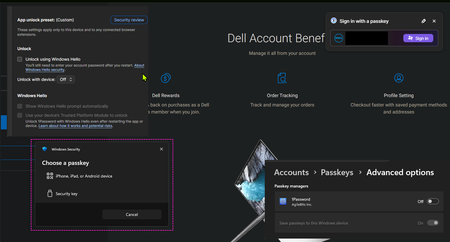
Howdy guys, I'm looking for some help with regards to passkeys and windows hello. I have windows hello disabled in the settings yet it pops up everytime at dell.com (I have a passkey for dell but I do NOT want windows hello unlocking my passkeys in 1password) I've included a screenshot with all the settings. It's weird. Also there are no locally stored passkeys except for my windows account passkey. Any ideas? Thanks.Solved47Views1like3Comments
How to Migrate 1Password Vaults to Bitwarden Folders (With Passkeys!) using iOS 26 CXP
I just finished migrating my credentials from 1Password to a fresh Bitwarden setup, and I wanted to share a workaround for a major pain point regarding vault organization and Passkeys. Those who used 1Password v7 will remember that exporting by vault was standard. In v8, this has been reduced to an "all-at-once" account export. If you want to maintain your organization during a move, this creates a mess. The Challenge: Maintaining Structure If you have multiple vaults (Work, Personal, Shared, etc.) and want them to land in specific Bitwarden Folders, an "all-at-once" export creates a massive, unorganized pile. Plus, standard file exports (CSV/1PUX) usually break Passkeys. The Solution: The "Single-Vault Pipeline" (iOS 26 CXP) By using the newly introduced Credential Exchange Protocol (CXP) on iOS 26, you can move your data app-to-app, vault-by-vault, and keep your Passkeys intact. (Note: I used a 1Password Family account and a free Bitwarden account for this). The Migration Manual: Prep 1Password (Web Browser) Log into 1Password.com on a desktop. Go to Manage Account > People > Select your account > Manage Vaults. The Trick: Deselect all vaults until only one is left visible to your user. Now, your mobile app will only "see" that specific vault. The CXP Transfer (iOS Device) Open the 1Password app on your iPhone/iPad. Navigate to Settings > Advanced > Start Export. Enter your account name (there is a hint at the bottom) and approve. Select Bitwarden as the destination. It will open Bitwarden and securely transfer everything from that one visible vault—including Passkeys and TOTP seeds. Assign to Folders (Bitwarden Desktop) Open the Bitwarden Web Vault on your computer. Click on "No Folder" (this shows all the items you just imported that don't have a folder assignment). Click the "Select All" checkbox at the top. Click the three dots (⋮) above the list > Add to Folder. (Note: You’ll need to create the folder first by pressing the + New button). Rinse and Repeat Go back to the 1Password web interface. Deselect the vault you just finished and select the next one. Repeat the iOS export. Because Bitwarden treats these as new "unassigned" items, you can neatly move the next batch into the correct folder. Why this is the optimal way: Passkeys & 2FA: Unlike file exports, CXP moves the actual cryptographic keys for Passkeys and your TOTP seeds. Shared Protocol: Because it uses a modern exchange protocol, misc info and custom fields transfer much more accurately than a messy CSV. Organization: You don't have to manually sort 1,000 items at once. You do it in controlled, vault-to-folder chunks. Hope this helps someone else stuck in the migration process!350Views2likes5Comments