Protect what matters – even after you're gone. Make a plan for your digital legacy today.
vault management
195 Topics
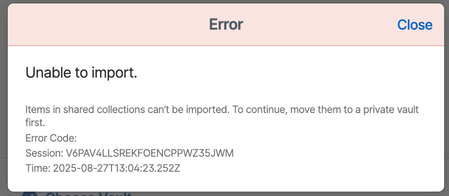
How to import Bitwarden organization vault?
I'm migrating my vaults from Bitwarden, where I have a family plan. My personal vault imported fine, but when I try to import my organization vault (containing shared credentials for my family) I get this error. I browsed the help pages for 1pass but I didn't find a solution. I'm not sure what "Move them to a private vault first" means. How do I import my shared family vault?197Views0likes4Comments
Secret Key unencrypted within browser developer settings - normal behavior?
Hi there, today I found out, when I go into my developer section of any of my browsers I found out, that 1Password does store a lot about your account: mail-address username vault name creation date of account userUUID using something like Fastmail-extension within 1Password ... and much much more And I also found out, that the Secret Key is stored there unencrypted and visible for anyone with access to this machine (and browser). Even when 1Password is locked, this information is available. How to find it? Just go into developer mode of any browser, search there for the extension and look at databases > accounts > a_by_uuid Is this 'normal' behavior? Within your security white paper you're talking about that it is stored encrypted on all computers. But why is it shown here in clear text?Solved41Views0likes1Comment
Severe issue with sync with local apps
Hello, I have a severe sync issues with 1Password account which is very limited, as I need to use the web version that has tons of limitations. I opened a support ticket number 546230, but I didn't receive a response. I already sent all the logs for troubleshooting. Please help, it's urgent. Thank you.16Views0likes1Comment
Feature Request: Archiving Vaults - Vault Management
Like many others I use vaults to separate my credentials into different digital environments, such as personal, university, work, client project, etc. When I finish university, or I complete a project for a client, I no longer need those credentials, thus I no longer need the entire vault. It would be great if there was a way to archive the entire vault in case I needed those credentials in the near future. The current solutions to this are not ideal. Given that these vaults have a single purpose, if I archived all the items in them, then the vault would be empty, and I can't delete it without deleting all the items that have been archived. The other option is to have a dedicated "Archive" vault and move everything into there then delete the original vault. That feels redundant given the archive feature that is already built-in, and it also means you can't easily restore all the credentials of a specific vault that you "archived". It also just consolidates the issue but doesn't eliminate it, as all those credentials are still there and show up in searches. Please consider adding the option to archive vaults, I think many users would find it useful, thanks!Solved21Views0likes1Comment
I need help transferring Vaults between two accounts under the same company organization
Hello, I’m hoping you can help clarify the correct process for moving my 1Password data from one account to another within the same company organization. Here’s the situation: I originally created my 1Password account using my former business unit email domain, which I’ll refer to as businessunit. I have since changed roles and moved to the corporate team, so I now have a new account under a different email domain, which I’ll refer to as corporateteam Both accounts are part of the same overall company organization and are owned by the corporate team. Based on the instructions I found, the process should be: To transfer 1Password data to a new account within the same organization, add the new account to your 1Password desktop app (Mac/Windows), then drag and drop items or entire vaults from the old account to the new one in the sidebar. Alternatively, use the "Move" option in the item context menu, ensuring you verify the transfer by signing into the new account at 1Password. However, I’m getting stuck before I can even try those steps. When I attempt to add the new account in the desktop app, I receive this error message: “You can only sign into one Corporate account at a time. Sign out of businessunit and try again.” Because of that, I’m unable to have both accounts signed in at once, so I can’t follow the transfer steps described in the instructions. I’m using a MacBook Pro. Can you advise on the correct way to move my password vault in this situation? Thank you.26Views0likes1Comment
Free account to paid
I have a free account and want to upgrade to the paid versoin, but i don't want to lose my passwords. Will that happen? I also did not save my security key when i signed up for the free account and have no idea how to retrieve it. Any help would be greatly appreciated.24Views0likes1CommentSupport for Imput's Helium Browser
Hiya! I'm an avid 1Password user and I utilize every possible corner of it. BUT there's a certain issue that I'm facing when I'm using it with unsupported browsers. Mainly, Helium Browser (https://github.com/imputnet/helium) which includes unbiased privacy at no compromise to webpage functionality isn't supported. This is an issue because there's no other browser I'd use. The problems that arise are apparent on all platforms, like: Manual addition in the 1Password app on macOS (which, lately, seems to spaz out when using it with the extension) Inability to use with the system app on Windows which inconveniences users by making them log into their vault twice (which, if I guarantee, many have a complex password for and can't bore themselves typing it out multiple times per session) Broken behaviour on Linux, where even with the custom browser config it still can't unlock the vault if it's unlocked on the system. No, I wasn't running the Flatpak version. IMHO 1Password is better than the competition in terms of UX, but seeing my daily driver struggle with that with no way to fix without resorting to this is awful.699Views3likes4CommentsHow to export secondary vaults?
I am having trouble exporting my 1Password vaults. I have a families account and have secondary vaults for each family member. When I export my family vault, I only get items exported from my default vault. This happens even if I have view + manage set for all of the secondary vaults. When I export a secondary vault CSV and go into the excel file, none of the items from the secondary vault are there. I have tried clicking on the vault, then doing the three dots, then export. I have tried changing the default save vault then doing the three dots then export. All of them just export my primary vault. What am I doing wrong? I am using 1Password for Windows 8.12.6 (81206039)37Views0likes4Comments
how do i undo...
I wanted to delete a vault eg vaultA but wanted to keep the items inside it. Step 1 - I tagged all vault items eg _vaultA Step 2 - I archived all items tagged _vaultA Step 3 - With vaultA now empty, I deleted the vault. Disaster: all archived items are gone. Is there a way to undelete?42Views0likes3CommentsSeparate family tags from mine
After sharing several items back and forth with my family, I keep seeing their tags on my tags list and they make no sense to me; my list is now "polluted" with irrelevant tags. Feature request: I would like to be able to hide tags from shared items.15Views0likes1Comment